
Screenshots



About SlideText
Fix the text in your slides in a minute, wherever you are.
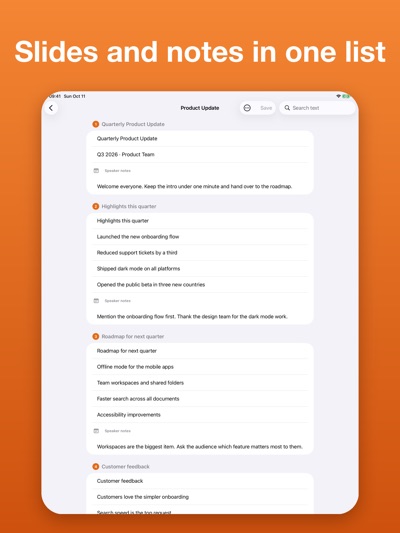
SlideText opens presentation files (.pptx) from Files, iCloud Drive or Mail and lists every slide with all its text and speaker notes. Tap a line, type, and save. That's it.
NO SURPRISES
• Only the words change. Fonts, colors, images, animations and layout stay exactly as they are.
• Change one word inside a styled line and its formatting is kept.
• Edited lines are marked, and you can revert any line with a swipe.
BUILT FOR QUICK FIXES
• Every slide at a glance, with speaker notes under each slide (can be hidden)
• Search across all slide text
• Preview the real slides, with your edits, before you save
• Save back into the same file, or share a copy
• Recent files list for quick access
• Works on iPhone and iPad, in light and dark mode
PRIVATE BY DESIGN
• No account, no ads, no tracking
• Your presentations never leave your device: the app makes no network connections
• Files are edited where they are stored (Files, iCloud Drive or another provider)
GOOD TO KNOW
• SlideText edits text only. It does not add slides, shapes or images, and it does not change formatting.
• Supports .pptx files. Older .ppt files can be saved as .pptx in PowerPoint or Keynote first.
• Text inside charts and SmartArt is not listed.
Perfect for last-minute corrections, updating a date or a name, polishing speaker notes on the train, or fixing a colleague's typo before the meeting.
PowerPoint is a trademark of Microsoft Corporation. SlideText is an independent app and is not affiliated with or endorsed by Microsoft.
AVALW Coverage
Not yet mentioned in AVALW articles.
Similar apps


 MyJio: For Everything JioJio Platforms LimitedTrue 5G, recharges, payments & UPI, music & movies, backup, games, news & more.★ 4.4 27428k


 Microsoft WordMicrosoft CorporationThis application requires a qualifying Microsoft 365 subscription. Microsoft 365 includes premium Word, Excel, and PowerPoint apps, 1 TB cloud storage in OneDri★ 4.8 17535k



 Samsung NotesSamsung Electronics Co, Ltd.(Samsung Notes is optimized for Samsung Galaxy Books. Other computers may have issues running it.) "Samsung Notes allows you to use the enhanced S Pen to write ★ 4.8 15228k



 ChatGPT ClassicOpenAIThe official ChatGPT desktop app brings you the newest model improvements from OpenAI. Do more on your PC with ChatGPT: · Instant answers—Use the [Alt + Space] ★ 4.8 11034k


 ChatGPTOpenAI OpCo, LLCIntroducing ChatGPT for iOS: OpenAI’s latest advancements at your fingertips. This official app is free, syncs your history across devices, and brings you the l★ 4.8 11034k


 Microsoft OutlookMicrosoft CorporationOutlook helps you stay connected and organized at the office and at home with easy access to emails, files, calendar events, and contacts across all your accoun★ 4.3 10673k


 Turbo VPN: Unlimited VPN ProxyINNOVATIVE CONNECTING PTE.LIMITEDDo you want online security and privacy while browsing? Turbo VPN now provides the fastest, reliable and encrypted network. With Turbo VPN, you can get the safe★ 4.7 10243k



 Microsoft ExcelMicrosoft CorporationThis application requires a qualifying Microsoft 365 subscription. Microsoft 365 includes premium Word, Excel, and PowerPoint apps, 1 TB cloud storage in OneDri★ 4.8 9702k
More by this developer


 PromptFlow: TeleprompterAbolfazl RejaliPromptFlow turns your iPhone into a clean, distraction-free teleprompter. SCRIPTS • Write scripts in the built-in editor • Import .txt files and export scripts -


 My Today Todo: Daily PlannerAbolfazl RejaliMy Today Todo turns your to-do list into a small daily quest. FEATURES • Quick add with natural input for dates, priorities and categories • Today, Upcoming, An-