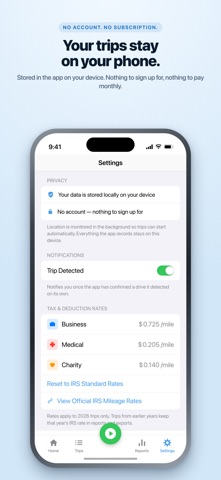
Smart Mileage Tracker automatically detects your drives and keeps a mileage log for tax deductions, with business, medical and charity trips priced at the IRS standard mileage rate in effect on each trip's date. Free to download. Automatic tracking is unlimited: no trip limit, no account, no subscription. Your trips are stored on your iPhone. DRIVE. SWIPE. EXPORT. - While driving: nothing. Trips start and stop on their own. - Once a week: swipe left for Business, right for Personal. - At tax time: export a CSV or PDF, or build a Year-End Tax Package. AUTOMATIC TRIP DETECTION - Drives are detected in the background using GPS and motion data. No button to press. - Walking is filtered out, start points are backdated to where you pulled away, and end times are trimmed to where you parked. - Auto-stop shows a countdown with a Cancel button. - A Trip Detected notification tells you when an automatic drive is being recorded. You can turn it off. - Open the app during a drive and a Live Activity keeps live distance and a running timer on the Lock Screen and, on iPhone models that have one, the Dynamic Island. - Optional Missed-Trip Recovery can rebuild a drive the app slept through from the places your iPhone recorded. Recovered trips are marked as estimates, without a route, for you to check. - Adjust the auto-start speed, stop delay and minimum trip distance, or limit automatic tracking to when your iPhone is plugged in. CLASSIFY IN SECONDS - Swipe left for Business, right for Personal. Press and hold for Medical, Charity, Moving or Other. - Classify a finished trip as Business or Personal from its notification. - Select several trips and classify them together. - Or let rules do it: work hours can file trips as Business, and any saved Favorite Location can carry its own category. THE DEDUCTION, ON SCREEN - Business, Medical and Charity miles are each priced at their IRS standard mileage rate. - Each trip uses the IRS rate in effect on its date, including the July 1, 2026 increase. - The Trips tab totals whatever you filter: count, distance and estimated deduction. - A Home Screen widget shows your year-to-date mileage deduction. - You can enter your own rates for the current year; they replace the built-in rates for that whole year. RECORDS FOR TAX TIME - Automatically recorded trips include the date, start and end times, start and end addresses, distance and a map of the route. - Business Purpose has its own field. Any trip can also carry notes and start and end odometer readings. - Add a trip by hand with a typed distance and optional addresses. - Search trips by address, place name, note or category. - Export CSV or PDF for a year, a quarter, recent months or custom dates. - The Year-End Tax Package builds one zip file for a tax year with a per-trip CSV, a summary PDF and a plain-text compliance summary, and shows a checklist of what is still missing. PRIVATE BY DESIGN - No account and no sign-in. - Trips are stored in a database on your iPhone. We run no server that receives them. - Street addresses and place names are looked up through Apple's Maps service. - No ads and no third-party analytics. - Back up your trips to a file you own and restore it later. The app also saves an automatic backup at most once a day when your trips change, keeping the 10 most recent in its folder in the Files app. - Miles or kilometers. BACKGROUND LOCATION Smart Mileage Tracker uses your location in the background, including when the app is closed or not in use, to detect and measure drives automatically. This requires the "Always" location setting. Continued use of GPS running in the background can decrease battery life. Deduction amounts are estimates based on IRS standard mileage rates and are not tax advice. Confirm your figures with a tax professional before filing. Help: smartmileagetracker.com/support
Finance · iPhone, iPad · Free
Rating: 4.6 out of 5, based on 25 user ratings.