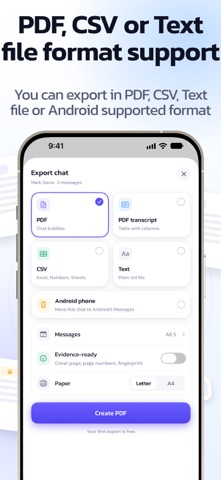
Your texts are full of things worth keeping: the address, the promise, the receipt, the "I love you", the proof. Backup SMS turns any conversation into a beautiful PDF, a tidy spreadsheet or a plain text file, right on your iPhone. No computer. No cable. No account. A whole chat goes from Messages to a finished, shareable file in a few taps. It's the backup your texts deserve. YOUR CHATS, OUT OF MESSAGES IN A FEW TAPS 1. Add the free import shortcut once. A 1-minute video in the app shows every tap. 2. Pick a chat and choose how far back: 7 days, 30 days, 12 months or everything. 3. Check who said what, then export. Next time, just pick a chat. The shortcut stays added. EXPORTS THAT LOOK AS GOOD AS THE CHAT • PDF chat: the conversation as you know it, with bubbles, names and days • PDF transcript: a clean table that's easy to read and print • CSV: every message in its own row, ready for Excel, Numbers or Google Sheets • Text: a simple .txt file that opens anywhere • Letter or A4 paper, ready to print, share, email or save to Files EVIDENCE-READY WHEN IT MATTERS Need your texts for a landlord, an employer, an insurer or a lawyer? Turn on Evidence-ready for a cover page, page numbers and a SHA-256 fingerprint. Anyone can recheck the fingerprint to confirm the file hasn't changed since you created it. MORE WAYS TO SAVE A CHAT • Screen recording: scroll through any chat while recording, and Backup SMS reads it on your iPhone • Screenshots: pick a few images and they become a searchable chat • Auto-save: a one-time Shortcuts automation saves every text you receive the moment it arrives • WhatsApp: open a chat exported from WhatsApp and it joins your library • Search every saved message in one place SWITCHING PHONES? Turn your chats into an SMS Backup & Restore file that restores into the Messages app on phones with different OS. One chat, or all of them at once. YOUR CONTACTS, TOO (FREE) • Back up every contact as a vCard file, photos included, or as a CSV spreadsheet • Send a contact by text with the card attached, or share it through any app PRIVATE BY DESIGN • Everything happens on your iPhone. Your texts are never uploaded. • No account and no ads • Lock the app with Face ID and hide your chats in the app switcher • Anonymous usage stats are off unless you turn them on, and never include your messages, names or numbers FREE TO TRY Import as many chats as you like and export the first 10 lines of any chat for free, in any format. Then unlock a single chat with One Chat, or go Lifetime: one payment, no subscription. Lifetime gives you unlimited full exports, many chats imported at once, your whole library as a ZIP and Family Sharing for up to 6 people. GOOD TO KNOW • Importing from Messages uses Apple's Shortcuts app and needs iOS 26 or later. • Apple only shares the texts you receive with automations, so auto-save keeps incoming texts. Import the chat to add your replies. • Messages decides what it shares with Shortcuts. If a chat arrives without times, your messages keep their order and the app tells you the dates are missing. Privacy Policy: https://www.dropouts.in/privacypolicy/privacy-policy.html Terms of Use: https://www.dropouts.in/privacypolicy/terms-of-use.html
Utilities · iPhone, iPad · Free