
Screenshots




About Snippet: Clipboard & Templates
The replies you send over and over live on a keyboard of their own, inside any app. The slow part was never writing them — it was copying their name and order number out of each message by hand. Snippet reads those out for you.
ON EVERY DEVICE
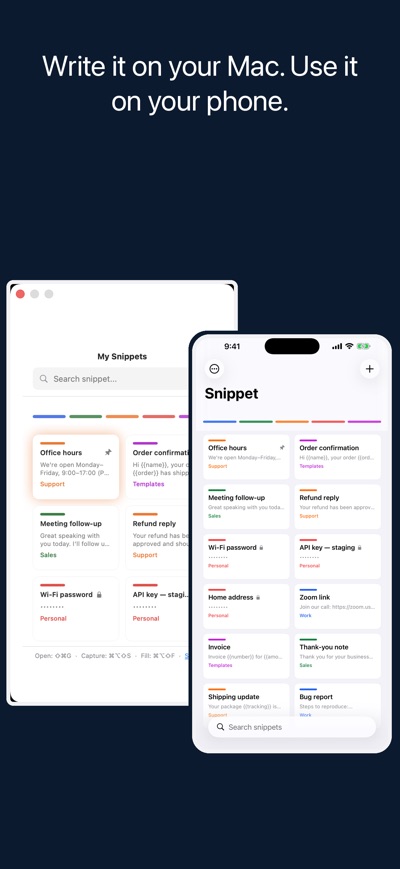
Write a reply on your Mac and it is on your phone before you pick it up. Your snippets, your categories, and your colors sync through your own iCloud account. No sign-up, no separate subscription, and nothing to restore by hand on a new device.
THE KEYBOARD
Save a reply once. Then, in Messages, Mail, WhatsApp, or anywhere else, switch to the Snippet keyboard and tap it in. No app switching, no copy and paste, and no losing your place in the conversation.
YOUR MAC'S CLIPBOARD, HERE
Turn on clipboard history in Snippet on your Mac, and recent text you copy there appears on your iPhone. Tap to copy it, swipe to save it as a snippet. Add from the iPhone too: the paste button, or share any text to Snippet and choose Add to Clipboard History.
SMART FILL
Select the message you just received, tap Share ▸ Snippet, and pick one of your templates. Snippet reads that message and fills every {{field}} in your reply from it — the name, the date, the order number, the address.
It never makes anything up. A value is used only if it actually appears in the message you selected; anything Snippet cannot find is left blank for you to complete. The message is held for that moment only and is never saved.
In practice: their message says "this is Maya Levi, my order is #4471". You pick your shipping-update template, and the reply comes back with the name and the order number already in it, ready to send.
Clients, customers, candidates, bookings: the same handful of questions, all day.
CATEGORIES, ASSIGNED FOR YOU
Other snippet apps hand you empty folders. Snippet reads each new snippet as you save it and files it into a colored category on its own, on your device. A genuinely new topic goes to "Other" instead of being forced into the wrong place. Nothing is uploaded, and it works offline.
ON YOUR MAC
Grab selected text from any app with a keyboard shortcut, and paste a snippet straight back.
EVERYTHING ELSE
• Pin the snippets you reach for most, and they sit at the top of the keyboard
• Write {{date}} or {{time}} in a snippet and it fills itself in when you use it
• Share extension — save selected text as a snippet, or run Smart Fill on it
• Instant search in any language, ignoring case and accents
• Categories you can rename and merge
• Title and tag suggestions while you write
• Lock a category behind Face ID or Touch ID, so what is in it stays private
FREE, WITH A ONE-TIME PRO UPGRADE
The keyboard, iCloud sync, automatic categorization, search, capture, and the Share extension are free. Pro adds Smart Fill, category encryption, and unlimited snippets — one purchase, not a subscription, covering Mac and iPhone together.
Snippet has no advertising and no analytics.
The automatic categorization, Smart Fill, and title suggestions run on Apple Intelligence and need a supported device on iOS 26 or macOS 26. Everything else works on iOS 17 and macOS 14 or later: the keyboard, sync, search, capture and encryption.
AVALW Coverage
Not yet mentioned in AVALW articles.
Similar apps


 MyJio: For Everything JioJio Platforms LimitedTrue 5G, recharges, payments & UPI, music & movies, backup, games, news & more.★ 4.4 27428k


 Microsoft WordMicrosoft CorporationThis application requires a qualifying Microsoft 365 subscription. Microsoft 365 includes premium Word, Excel, and PowerPoint apps, 1 TB cloud storage in OneDri★ 4.8 17535k



 Samsung NotesSamsung Electronics Co, Ltd.(Samsung Notes is optimized for Samsung Galaxy Books. Other computers may have issues running it.) "Samsung Notes allows you to use the enhanced S Pen to write ★ 4.8 15228k



 ChatGPT ClassicOpenAIThe official ChatGPT desktop app brings you the newest model improvements from OpenAI. Do more on your PC with ChatGPT: · Instant answers—Use the [Alt + Space] ★ 4.8 11034k


 ChatGPTOpenAI OpCo, LLCIntroducing ChatGPT for iOS: OpenAI’s latest advancements at your fingertips. This official app is free, syncs your history across devices, and brings you the l★ 4.8 11034k


 Microsoft OutlookMicrosoft CorporationOutlook helps you stay connected and organized at the office and at home with easy access to emails, files, calendar events, and contacts across all your accoun★ 4.3 10673k


 Turbo VPN: Unlimited VPN ProxyINNOVATIVE CONNECTING PTE.LIMITEDDo you want online security and privacy while browsing? Turbo VPN now provides the fastest, reliable and encrypted network. With Turbo VPN, you can get the safe★ 4.7 10243k



 Microsoft ExcelMicrosoft CorporationThis application requires a qualifying Microsoft 365 subscription. Microsoft 365 includes premium Word, Excel, and PowerPoint apps, 1 TB cloud storage in OneDri★ 4.8 9702k
More by this developer


 AudioReady: Edit & Check AudioYechiel Ben DavidAudioReady edits and transcribes audio, checks it against the delivery standards platforms publish, and writes a corrected copy. Trim and split a recording on i-


 Storeframe: Screenshot StudioYechiel Ben DavidStoreframe is a native Mac app that turns one raw screenshot into localized, App Store–ready marketing images. Drop in a screenshot, frame and style it, write a-


 Voynich: Encryption You OwnYechiel Ben DavidVoynich encrypts your files and folders where they already sit, and keeps your passwords in an encrypted document. Both open with one master key, released by To-


 Bitstrom: Stream to playerYechiel Ben DavidEverything you listen to, in one search and one library: internet radio from the directories or stations whose address you choose to add to the app, podcasts, y-