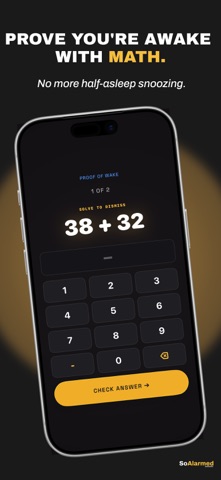
So Alarmed is the alarm clock for people who keep hitting snooze. To turn an alarm off, you finish a short wake mission first, so you're actually up before it stops. CHOOSE HOW YOU PROVE YOU'RE AWAKE • Math: solve a few problems • Typing: type a phrase exactly • Memory: repeat a light sequence • Color reflex: tap the ink color, not the word • Maze: steer your way out • Shake: shake your phone awake • Steps: get up and walk • Squats and push-ups: counted with your camera • Barcode: scan a barcode you registered, like the toothpaste in your bathroom Pick a mission and difficulty for each alarm. If a mission is too hard, the ring offers an easier one after about a minute, and a "Something's wrong" exit is always there if you are genuinely stuck. BUILT TO WAKE YOU UP • Designed to ring through Silent Mode and Focus using the built-in iOS alarm system • Set repeat days, a memo that shows when the alarm rings, 12-hour or 24-hour time, and a volume for the in-app ring • Choose from a large library of alarm sounds, from gentle to loud, and preview each one • Wake themes for the ring screen KEEP YOUR STREAK, SEE YOUR PROGRESS • Streak ring and weekly consistency in Insights • Streak freezes for the mornings that go wrong • Optional: connect Apple Health to see your sleep duration and timing next to your wake stats. So Alarmed only reads sleep data, never writes to Health, and it stays on your phone. TOMORROW STARTS TONIGHT • Unwind: calming sleep and focus sounds with a timer • Bedside mode: a dimmed, distraction-free clock for your nightstand • Home Screen and Lock Screen widgets SUBSCRIPTION So Alarmed is free to download and requires a subscription to use. Choose a yearly plan, which starts with a 7-day free trial, or a monthly plan. Prices are shown in the app before you subscribe. Payment is charged to your Apple Account at confirmation of purchase, and subscriptions renew automatically unless canceled at least 24 hours before the end of the current period. Manage or cancel any time in your Apple Account settings. Terms of Use: https://jyothiprasanthdr.github.io/so-alarmed-privacy/terms.html Privacy Policy: https://jyothiprasanthdr.github.io/so-alarmed-privacy/
Health & Fitness · iPhone, iPad · Free
Rating: 4.0 out of 5, based on 6 user ratings.