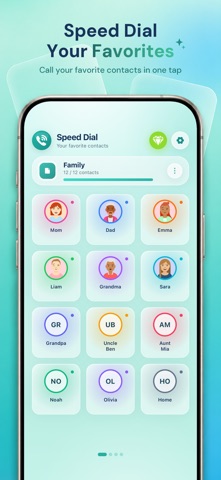
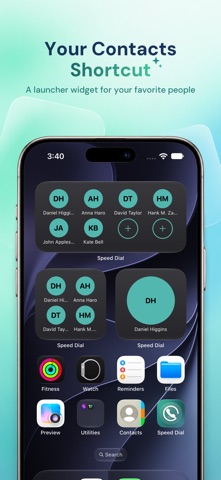
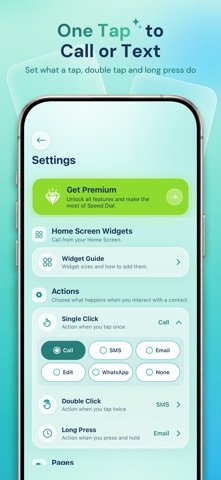
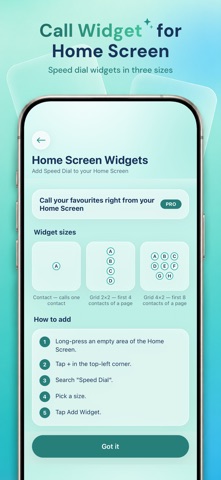
Speed Dialer puts the people you call most on one screen, so calling Mom, the office or your best friend takes a single tap. No scrolling through contacts, no searching, no typing a number. Pick your favorite contacts, give each one a photo or a color, and they appear as large, easy-to-hit buttons. Tap one and the call starts. It is a fast phone dialer for anyone, and the big photo buttons make it a simple calling screen for parents, kids and seniors. Add a speed dial widget to your Home Screen and your favorites are one tap away without opening the app at all. ONE TAP TO CALL, TEXT OR EMAIL • Tap a contact to call straight away • Choose what a tap, a double tap and a long press do: call, SMS, email or edit • Contacts with several numbers let you pick the one to dial PAGES FOR EVERY PART OF LIFE • Keep family, work, friends and emergency numbers on their own pages • Swipe between pages, rename them and drag them into any order • Choose how many contacts each page shows, from a few big buttons to a full grid • Turn pages off when you don't need them, without losing what's on them MAKE EVERY CONTACT EASY TO SPOT • Add a photo from your library, or let the contact's initials stand in • Give each contact its own color • Hide the name and show only the photo • Pick rounded or square buttons • Drag contacts to arrange them, and edit a name, number or email at any time HOME SCREEN WIDGETS • Add a contact widget and call a favorite without opening the app • Three sizes: a single contact, a 2×2 grid or a 4×2 grid • Choose which contact or page each widget shows MADE FOR IPHONE AND IPAD • A clean glass design that stays readable with larger text • On iPad, four contacts across and bigger pages • An iPad without cellular places calls through your iPhone, and the app walks you through the setup SPEED DIALER PRO • Home Screen widgets • More pages, up to 25 • More contacts on every page • WhatsApp as a tap action, to open a chat with a contact • Backup and restore, so your pages move with you to a new iPhone • No ads Speed Dialer asks for access to your contacts so you can choose who to add from your phonebook. Your speed dial list stays on your device. Questions or feedback: app-support@md-tech.in Privacy Policy: https://speed-dial.apppage.co/privacy-policy Terms of Use: https://www.apple.com/legal/internet-services/itunes/dev/stdeula/
Utilities · iPhone, iPad · Free
Rating: 4.6 out of 5, based on 29 user ratings.