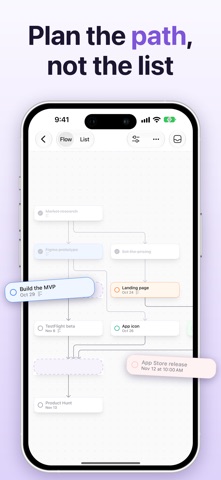
Taskroot is a task manager where tasks are linked by what depends on what. Instead of a long list, you see the path to your goal — and exactly what you can do right now. PLAN THE PATH, NOT THE LIST • Put tasks on a chart and link them with arrows: a task becomes available when everything before it is done. • Build a plan from the goal backwards or step by step, with the keyboard or by touch. • The chart arranges itself, top to bottom or left to right. EVERY DETAIL IN ITS PLACE • Notes, colour, tags, a due date and time, who it's delegated to, a place and attachments — in a card that unfolds right on the chart. • Upcoming, Anytime, Delegated and Completed lists across all your projects. LET AI DRAFT THE PLAN • Make a Plan… turns a goal into steps with the links between them — brief, normal or detailed. • Suggest the steps before or after any task, with Apple Intelligence on your device or with Claude. SEE IT YOUR WAY • Switch between the chart and a list in the order the work can be done. • Focus on one goal and everything else steps back; filter by tag, colour or what's available now. • Park ideas in the backlog and bring them onto the chart when it's time. EVERYWHERE YOU WORK • Mac, iPhone and iPad, kept in sync through iCloud. • Quick entry from anywhere on your Mac, the share sheet, export to PNG and PDF. • Let AI assistants work with your projects over MCP. TASKROOT PRO Two projects are free. Pro adds unlimited projects, plus plans and suggestions by Claude. Pro is a monthly or yearly subscription. Terms of Use: https://www.apple.com/legal/internet-services/itunes/dev/stdeula/ Privacy Policy: https://taskroot.tarasenka.me/privacy
Productivity · iPhone, iPad · Free