
Screenshots


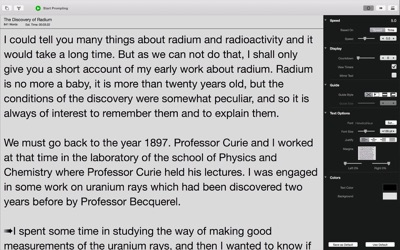


About Teleprompt+
"...it's a great program to have if you plan to give a speech." - TUAW.com
NEW VERSION 3.0 - Compatible with Teleprompt+ 3 for iOS. Added rich text, quick edit, new remote functionality, timed prompting sessions, Box service import and export and much more.
Note: This version is no longer compatible with previous versions of Teleprompt+ 2 or below. Please contact support if you still require this version.
The most advanced and full-featured professional teleprompter for the iPad, iPhone, and iPod touch is now also for the Mac! Available for Mountain Lion, Mavericks and Yosemite. Control the teleprompter running on your Mac with your iPhone, iPod, iPad, or another Mac!
Teleprompt+ is a simple yet powerful professional teleprompter for your Mac. Perfect for presenters, lecturers, students, teachers, broadcasters, podcasters, filmmakers, musicians, business professionals, or anyone who would benefit from having a powerful visual aid while engaged in a public speaking activity.
STANDARD FEATURES:
Write your scripts using the robust text editor, or import your text from other applications or online services.
Track your progress using the integrated timer display (estimate, actual, elapsed and remaining time).
Pause, play, and adjust scrolling speed during prompting using on-screen controls or gestures.
ADVANCED FEATURES:
RICH TEXT
Sometimes you need certain words to stand out. With rich text editing you can make specific portions of your script bold, underline, or italic, or change the color of the text of selected words, phrases, or entire paragraphs with ease.
QUICK EDIT
Quick edit allows you to make quick changes to your script without ever leaving the prompting screen.
REMOTE SESSIONS
Use a Mac or iOS device with Teleprompt+ installed to remotely control speed, font size, and scrolling of any number of other Mac or iOS devices running Teleprompt+ via Wifi.. Also edit the script right from the remote device and the changes are immediately displayed on all connected devices.
VIDEO AND AUDIO RECORDING
Record yourself or your talent with the built-in microphone and/or camera on your Mac.
PRECISION PROMPTING AND SPEED CONTROL
Choose between 100 fine-tuned scrolling speeds or choose the total time for your presentation and the scrolling speed will adjust automatically.
Use the speed wheel for precision scroll speed adjustment during prompting.
IMPORT AND EXPORT
Import and export plain text, Word documents (.docx) and rich text (.rtf) files from the app to your Dropbox or Google Drive accounts. Allows for quick editing and synchronization of your scripts on any device with either Dropbox, Google Drive or Box.
READING GUIDES
Improve your focus with one of three reading guide styles.
CUE POINTS
Easily add cue points while editing and quickly advance or return to a cue point during prompting
TEXT MIRRORING
Text can be inverted on screen (for teleprompter reflector setups)
DUAL SCREEN SUPPORT
Have two monitors connected to your Mac? You can use both as prompting screens. One to control the prompting and other for the talent.
Questions/feedback? We care deeply about our customers and want them to have the best experience possible with our products. If you are having any issues with Teleprompt+, we want to help. Please contact us through email at support@bombingbrain.com. If you have a problem or question please do not put this in an app review as we have no way of responding or helping you through reviews.
If you're enjoying Teleprompt+ 3 please consider leaving a review. It greatly helps get the word out about the app so we can continue to improve and grow the app.
AVALW Coverage
Not yet mentioned in AVALW articles.
Similar apps


 MyJio: For Everything JioJio Platforms LimitedTrue 5G, recharges, payments & UPI, music & movies, backup, games, news & more.★ 4.4 27428k


 Microsoft WordMicrosoft CorporationThis application requires a qualifying Microsoft 365 subscription. Microsoft 365 includes premium Word, Excel, and PowerPoint apps, 1 TB cloud storage in OneDri★ 4.8 17535k



 Samsung NotesSamsung Electronics Co, Ltd.(Samsung Notes is optimized for Samsung Galaxy Books. Other computers may have issues running it.) "Samsung Notes allows you to use the enhanced S Pen to write ★ 4.8 15228k



 ChatGPT ClassicOpenAIThe official ChatGPT desktop app brings you the newest model improvements from OpenAI. Do more on your PC with ChatGPT: · Instant answers—Use the [Alt + Space] ★ 4.8 11034k


 ChatGPTOpenAI OpCo, LLCIntroducing ChatGPT for iOS: OpenAI’s latest advancements at your fingertips. This official app is free, syncs your history across devices, and brings you the l★ 4.8 11034k


 Microsoft OutlookMicrosoft CorporationOutlook helps you stay connected and organized at the office and at home with easy access to emails, files, calendar events, and contacts across all your accoun★ 4.3 10673k


 Turbo VPN: Unlimited VPN ProxyINNOVATIVE CONNECTING PTE.LIMITEDDo you want online security and privacy while browsing? Turbo VPN now provides the fastest, reliable and encrypted network. With Turbo VPN, you can get the safe★ 4.7 10243k



 Microsoft ExcelMicrosoft CorporationThis application requires a qualifying Microsoft 365 subscription. Microsoft 365 includes premium Word, Excel, and PowerPoint apps, 1 TB cloud storage in OneDri★ 4.8 9702k
More by this developer


 SetlistsBombing Brain InteractiveNew Version 2.1 - Now with backing tracks and metronome! Catalog your repertoire. Prompt your lyrics live on stage. Keep everyone in sync. If you perform live o★ 2.1 187


 Teleprompt+ 3Bombing Brain InteractiveThe industry-leading professional teleprompter for iOS just got a whole lot better! Featuring a brand-new design and a ton of new features, Teleprompt+ 3 is per★ 2.5 46