
Screenshots



About Termi: Assignment Tracker
Termi shows you on your Home Screen what's due next and which course it belongs to. Assignments, presentations and exams appear with a course code and the days until the deadline, on the Lock Screen too.
Deadlines, course by course
Every course gets a short code like R&P or STAT and one of 12 colors. The color belongs to the course, not to each entry. Titles stay short, and you can tell the course at a glance, even in the small widget.
A widget for every spot
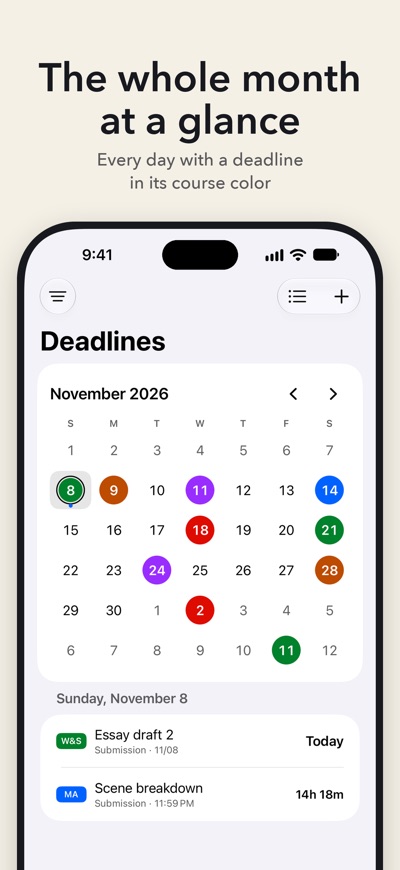
Small with a big day count, medium and large as a list, extra large in two columns on iPad. On the Lock Screen as a ring, a rectangle or a line above the clock. The month widget shows every day with a deadline in the color of its course. From iOS 27, the semester widget in the 4×6 format adds a timeline. Every widget can be limited to certain courses, and the day count updates after midnight without opening the app.
A deadline in seconds
Course, type, date. The title is optional. When you add a presentation, Termi can add the submission before it as well, 2 days earlier by default. With “Add another”, the course stays selected, so you can enter several deadlines in a row.
Reminders that match the deadline
Termi reminds you 7, 3 and 1 day before at 9:00 AM by default. You choose the days and the time, for all deadlines or just one. Check it off right in the notification. Done items leave the widget and can be brought back at any time. Deadlines with a time show the hours and minutes left during the last 24 hours.
List or month
The list is sorted into Overdue, This week and the months ahead, and a filter shows a single course. One tap switches to the month view, where you see when deadlines pile up.
Start the semester without retyping
Import events from your calendar or from an .ics file. Termi suggests the course from the title and recognizes words like exam, midterm, quiz or presentation. Nothing gets added twice.
iPhone and iPad, no account
Your deadlines sync between iPhone and iPad through your iCloud.
Free, with everything included
Termi has no paywall and no subscription. If the app helps you, you can leave a one-time tip. It comes with three other app icons, nothing else changes.
What Termi is not
Termi is not a class schedule and not a grade tracker. It takes care of deadlines: assignments, presentations, exams and any type you create yourself. A course can also be called Job or Personal.
Add your first deadline. Course, type, date. That's all it takes.
AVALW Coverage
Not yet mentioned in AVALW articles.
Similar apps


 MyJio: For Everything JioJio Platforms LimitedTrue 5G, recharges, payments & UPI, music & movies, backup, games, news & more.★ 4.4 27428k


 Microsoft WordMicrosoft CorporationThis application requires a qualifying Microsoft 365 subscription. Microsoft 365 includes premium Word, Excel, and PowerPoint apps, 1 TB cloud storage in OneDri★ 4.8 17535k



 Samsung NotesSamsung Electronics Co, Ltd.(Samsung Notes is optimized for Samsung Galaxy Books. Other computers may have issues running it.) "Samsung Notes allows you to use the enhanced S Pen to write ★ 4.8 15228k



 ChatGPT ClassicOpenAIThe official ChatGPT desktop app brings you the newest model improvements from OpenAI. Do more on your PC with ChatGPT: · Instant answers—Use the [Alt + Space] ★ 4.8 11034k


 ChatGPTOpenAI OpCo, LLCIntroducing ChatGPT for iOS: OpenAI’s latest advancements at your fingertips. This official app is free, syncs your history across devices, and brings you the l★ 4.8 11034k


 Microsoft OutlookMicrosoft CorporationOutlook helps you stay connected and organized at the office and at home with easy access to emails, files, calendar events, and contacts across all your accoun★ 4.3 10673k


 Turbo VPN: Unlimited VPN ProxyINNOVATIVE CONNECTING PTE.LIMITEDDo you want online security and privacy while browsing? Turbo VPN now provides the fastest, reliable and encrypted network. With Turbo VPN, you can get the safe★ 4.7 10243k



 Microsoft ExcelMicrosoft CorporationThis application requires a qualifying Microsoft 365 subscription. Microsoft 365 includes premium Word, Excel, and PowerPoint apps, 1 TB cloud storage in OneDri★ 4.8 9702k


