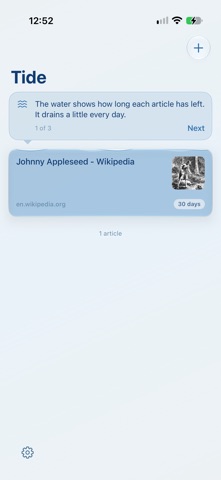
Tide is a reading list that doesn't let things pile up. Save an article and you get 30 days to read it. Then it flows out. No exceptions, no snooze button. Most reading lists turn into a guilt pile. Tide doesn't. Every article shows how much of its tide is left, so you can see what's about to go and actually read it. And if it flows out, it probably wasn't that important. If it was, it'll wash up again. Saving In Safari or any app, tap Share and choose Tide. It's saved right away, and you can fix the title before closing if you want. You can also paste a link in the app or save from Shortcuts. Reading Tap an article to read it. Turn on Reading View in Settings and articles open as clean text, without clutter. If a site doesn't work that way, it just opens the normal page. On iPad or with your iPhone turned sideways, your list and the article sit side by side. Listening Tide can read articles to you. Touch and hold an article and choose Listen, or ask Siri to "Read my next article in Tide." It keeps going with your phone locked, and it remembers where you stopped. Offline Tide keeps a clean copy of every article, so you can still read on a plane or the subway. Reminders Get a heads-up before something flows out. You pick how many days ahead, or turn reminders off. Widgets • Flowing Out shows what's leaving soonest. • Surprise Me picks a random article for you, with a shuffle button. Done reading When you finish an article, mark it done and it's gone. That's the point. Private Tide doesn't collect anything. No accounts, no tracking. Your list stays on your device, and reading aloud happens on your device too. 30 days. Read it or let it go.
Productivity · iPhone, iPad · Free
Rating: 5.0 out of 5, based on 1 user ratings.