
Screenshots



About Timetable – Schedule & Tasks
A simple and clear timetable app for university, school, and everyday planning.
Manage your courses, lessons, tasks, and events in one place.
Timetable
Create your personal timetable for a 5-day week in seconds and add as many courses as you need. Start and end times are fully adjustable, and the day view expands automatically.
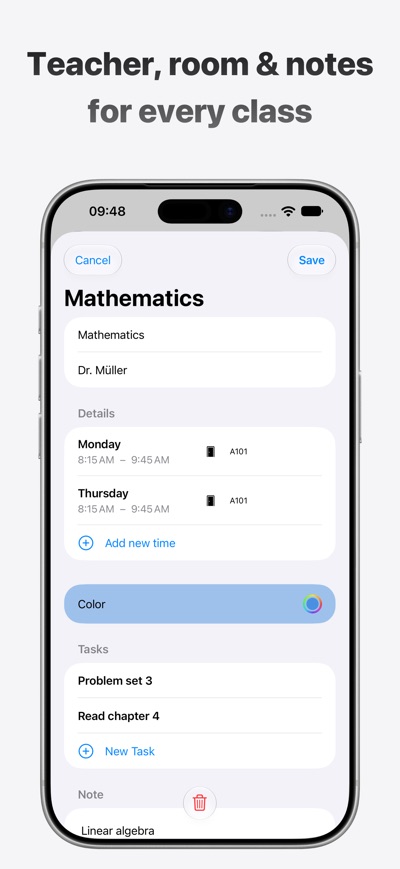
For every course you can save the teacher, room, color, notes, and optionally a place on the map.
The current weekday and time are shown automatically. Turn your phone to see the whole week in landscape.
Tasks and events
Add homework, projects, or notes to each subject. Set a due date and a reminder so you never miss a deadline.
Plan events like exams or field trips as well – with reminders, too.
Sharing and backup
Share timetables and courses with friends or create a backup file to keep your data safe, even when switching devices.
Included for free
• Timetable for a 5-day week with day and week view
• Unlimited courses with room, teacher, color, notes, and place
• Tasks and events with due dates and reminders
• Sharing and backup
• Your data stays on your device – no account, no tracking
Timetable Pro (paid)
Pro additionally unlocks:
• Multiple timetables, for example one per semester
• A/B week cycle for courses that only take place every other week
• 6 or 7 days per week
• Home Screen widget with your next lessons
• PDF export for printing – for week A, week B, or both
• Custom accent color for the app
Pro is available as an auto-renewing yearly subscription or as a one-time purchase. Prices are shown in the app. You can cancel the subscription at any time in your Apple Account settings.
Timetable focuses on simplicity. It’s made for anyone who wants to keep an overview of their weekly schedule without unnecessary features.
Terms of Use: https://www.42deg.com/timetable/terms
Privacy Policy: https://www.42deg.com/timetable/privacy
AVALW Coverage
Not yet mentioned in AVALW articles.
Similar apps


 MyJio: For Everything JioJio Platforms LimitedTrue 5G, recharges, payments & UPI, music & movies, backup, games, news & more.★ 4.4 27428k


 Microsoft WordMicrosoft CorporationThis application requires a qualifying Microsoft 365 subscription. Microsoft 365 includes premium Word, Excel, and PowerPoint apps, 1 TB cloud storage in OneDri★ 4.8 17535k



 Samsung NotesSamsung Electronics Co, Ltd.(Samsung Notes is optimized for Samsung Galaxy Books. Other computers may have issues running it.) "Samsung Notes allows you to use the enhanced S Pen to write ★ 4.8 15228k



 ChatGPT ClassicOpenAIThe official ChatGPT desktop app brings you the newest model improvements from OpenAI. Do more on your PC with ChatGPT: · Instant answers—Use the [Alt + Space] ★ 4.8 11034k


 ChatGPTOpenAI OpCo, LLCIntroducing ChatGPT for iOS: OpenAI’s latest advancements at your fingertips. This official app is free, syncs your history across devices, and brings you the l★ 4.8 11034k


 Microsoft OutlookMicrosoft CorporationOutlook helps you stay connected and organized at the office and at home with easy access to emails, files, calendar events, and contacts across all your accoun★ 4.3 10673k


 Turbo VPN: Unlimited VPN ProxyINNOVATIVE CONNECTING PTE.LIMITEDDo you want online security and privacy while browsing? Turbo VPN now provides the fastest, reliable and encrypted network. With Turbo VPN, you can get the safe★ 4.7 10243k



 Microsoft ExcelMicrosoft CorporationThis application requires a qualifying Microsoft 365 subscription. Microsoft 365 includes premium Word, Excel, and PowerPoint apps, 1 TB cloud storage in OneDri★ 4.8 9702k
More by this developer


 Block phone numbers - BlockrMichael BanholzerTake back control of your phone. Blockr lets you block unwanted calls — from single numbers to entire ranges — in seconds. No more spam. No more scam calls. No ★ 5.0 1


 Time Tracker - GeofyMichael BanholzerGeofy tracks the time you spend at your important places — automatically when you arrive and leave, or manually with a timer. Define regions on a map and Geofy ★ 4.3 15