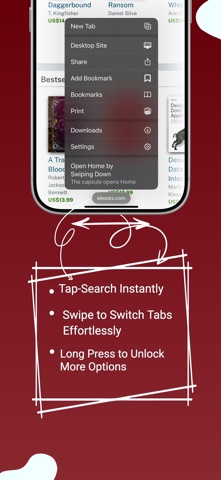
THE CAPSULE Tap it to search. Hold it for the menu. Drag it upward to pull out a new tab. Everything the browser does lives on that one control, so the page keeps the screen. BLOCKING A filter engine built into the app, running the same lists desktop blockers use — EasyList, EasyPrivacy, and nearly sixty more you can switch on. Four levels, from off to blocking a site's own requests as well. Pop-ups and pop-unders are handled by their own rules. Cookie banners can go too. The lists refresh themselves through the day rather than sitting frozen until the next app update, so a site that quietly stops being blocked starts working again on its own. DOWNLOADS Files a site offers as downloads save without leaving the page. They land in an encrypted vault inside the app rather than loose on your phone, sorted by kind, and go to Files whenever you choose. READER Keep a whole page — text, images, layout — and read it back later with no network at all. DESIGN Glass, and you decide how much. Frosted or clear. How much of the page shows through. Whether a gradient sits on the glass or behind everything. Wallpapers, including moving ones. A choice of app icons. Which buttons sit on the start box, and in what order. PRIVACY No analytics. No account. No profile. Nothing about you is collected, and nothing is sent anywhere. Private tabs can be locked behind Face ID. HTTPS-only is a switch. Shred App Data clears everything the browser has kept, in one go. Requires iOS 26.
Utilities · iPhone, iPad · Free
Rating: 5.0 out of 5, based on 1 user ratings.