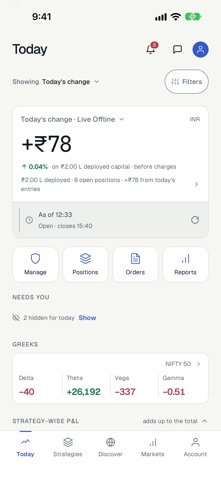
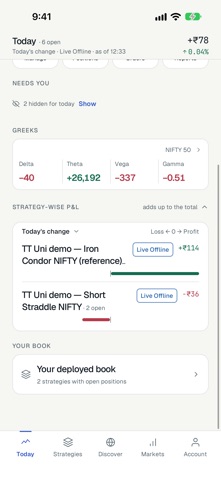
Tradetron runs your trading strategies as algorithms: built without code, tested against history, and deployed in your own broker account or on paper. This app is where you watch them and act on them. TODAY Open the app to your book. One figure - today's change, today's entries, or since entry - matches your dashboard on tradetron.tech under the same saved filter. Under it: where the figure came from, your open legs, P&L by strategy, and a short list of what needs you, from a broker session to renew to a strategy that stopped with an error. When you run both live and paper, switch between All, Live and Paper in one tap. STRATEGIES Every deployed strategy with its figures, legs, orders, alerts and notes. Manage many at once - pause, resume, resize or square off - with the impact shown before anything is sent. Your own strategies and your backtests sit in the same place. ACTIVITY Open positions, the order book, greeks, notifications and the broker order tally. DISCOVER Strategies published by creators on the Tradetron marketplace, with their capital, drawdown and fees stated up front. CREATE Start from the phone: the Advanced Wizard, a template, or Pin the Range - pick where NIFTY stays for the week and an iron condor is created in your account. Or connect your own AI app (Claude, ChatGPT and others) to build strategies in your account. The full builder stays on tradetron.tech, where the screen is big enough for it. MARKETS Your watchlists and the indices you follow, with an option chain and charts. ASK TRADETRON Ask questions about your account and the platform in plain words, attach a screenshot, and hand the chat to a person on our support team when you need one. OFF THE APP - Live P&L on the Lock Screen and in the Dynamic Island during market hours, always stamped with the time it was priced. - A home-screen widget with the day's P&L, open legs and anything in error. - Alerts that reach you through Focus when a deployment needs attention, with Acknowledge right on the alert. - Ask Siri "How is my book in Tradetron" or "What needs me in Tradetron". BUILT FOR TRADERS - Native on iPhone, in light and dark. - Exits, square-offs and restarts ask for Face ID or a typed confirmation first. Pausing a live strategy names it and asks for Face ID too; a paper pause is one tap and can be undone. Nothing on the Lock Screen, a widget or a voice command can move money. - Lock the app with Face ID, and hide figures with one tap when someone is looking. - Several Tradetron accounts on one phone, switched in a tap. - Sign in with your Tradetron account, Apple, Google or Facebook. Tradetron works with your existing broker account. A Tradetron plan is needed to deploy strategies live; paper trading is available on every plan. For educational purposes. Trading in securities is subject to market risk. Read all related documents carefully before investing. Terms of use: https://tradetron.tech/pages/terms-of-use Privacy policy: https://tradetron.tech/pages/privacy-policy
Finance · iPhone, iPad, Android · Free
Rating: 4.6 out of 5, based on 9 user ratings.