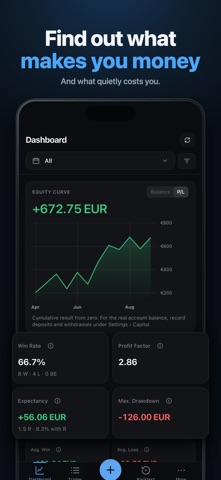
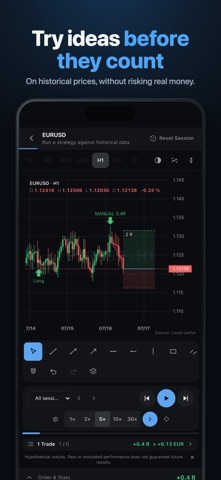
Every trade says something about how you trade. In a spreadsheet you mostly miss it. TradeJrnl puts each trade on the price chart, so you can see where you got in, where your stop was and what the market did next. If you trade on cTrader, you don't have to type anything in. Connect your account and your trades come into your journal with entry, exit, size and fees. The connection is read-only, so TradeJrnl can't place orders. Price data is retrieved through your cTrader account, depending on what your broker makes available. On MetaTrader 4 or 5, the TradeJrnl exporter picks up your trades automatically on desktop. You can also import your history from an MT4, MT5 or cTrader CSV file, or add trades by hand. On the chart you see entry and exit, and stop and target once you add them. You don't need screenshots for that anymore, though you can still attach them. Give each trade notes, a strategy, tags and a rating. You can log the setups you skipped too. The trades you didn't take often teach you just as much. Replay plays a closed trade back candle by candle, so you see the chart as it looked when you got in. New ideas go into the backtester first, bar by bar on historical prices, before real money is on the line. Save as many backtest sessions as you like and compare them. Your analytics show where your money comes from and where it goes: net P&L, win rate, profit factor, expectancy and maximum drawdown, plus calendars, heatmaps, your R distribution and breakdowns by strategy, session, symbol and direction. If you run several accounts, record deposits and withdrawals per account and edit several transactions at once. Your journal stays on your device. For backup and sync you pick the folder yourself; which cloud folders show up depends on your device and provider. Standard backups contain your journal and screenshots. Price data isn't included, and you can download or import it again at any time. Two things to know before you start. Charts, replay and backtests need price data, either through cTrader or from a file, for example from HistData, Dukascopy, TradingView or MetaTrader. And R values and percentage drawdown need your risk and capital details. TradeJrnl is a monthly or annual subscription. New subscribers get 14 days free, once per store account. You sign in with your email so your subscription works on all your devices. Signing in doesn't move your journal data; backup and sync with your own folder does that. You see the price and renewal terms before you buy. If your subscription ends, your journal stays on your device and you can still read and export it. TradeJrnl does not place orders or give investment advice. Replay and backtests use historical data and don't predict future results. Standard EULA: https://www.apple.com/legal/internet-services/itunes/dev/stdeula/
Finance · iPhone, iPad, Android · Free