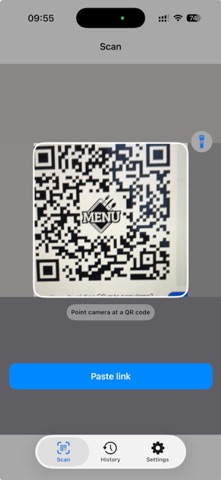
TrustLens helps you decide before you tap. Scan QR codes and analyze links to spot phishing and scam signals before opening a page. TrustLens shows the real destination, explains risk indicators in plain language, and keeps your checks private on your device. How it works: - Scan a QR code or paste a URL - Expand short links and follow redirect chains safely - Score risk from 0-100 and label it Safe, Caution, or Danger - Show clear reasons (HTTP, suspicious keywords, unusual domains, too many redirects, and more) - Recommend what to do next: Open normally, Open with caution, or avoid and use the official site Key features: - QR scanner with torch and large viewfinder - “Analyze” confirmation step before any link opens - Safe Open flow with extra warning for high-risk links - Share Sheet extension: analyze links from other apps - Save analysis history with date, domain, and risk level - Share a readable safety report - Trusted domain whitelist to reduce false alarms - Multilingual support Privacy first: - On-device analysis: scanned and shared URLs are processed locally - No scanned URLs are uploaded to our servers - Personalized ads are optional and off by default - ATT permission is requested only if you choose personalized ads Important: TrustLens provides risk indicators to help reduce risk. It is not antivirus software and cannot guarantee total protection. Always verify sensitive actions on official websites.
Utilities · iPhone, iPad, Android · Free