
Tutorial for Microsoft Word - Best Free Guide For Students As Well As For Professionals From Beginners to Advanced Level Examples
Referencerana hamad khan
iPhone iPadFree
Store rating
4.2 ★
Store ratings
18
AVALW mentions
0
Price
Free
Platforms
2
Listed
Oct 15, 2026
Screenshots
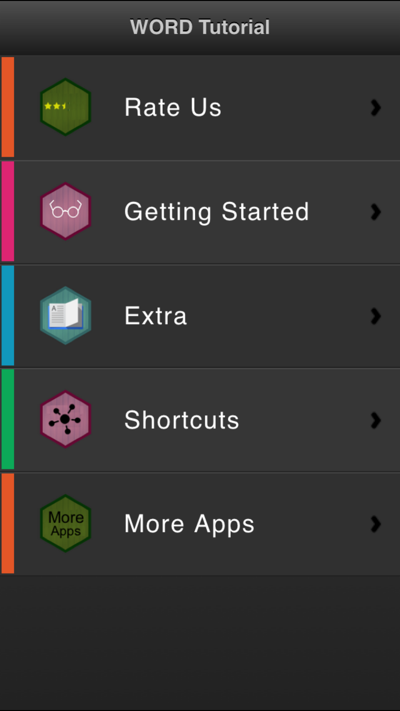
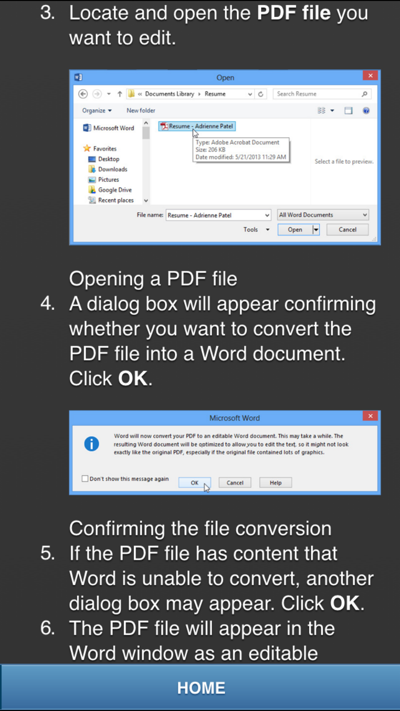


About Tutorial for Microsoft Word - Best Free Guide For Students As Well As For Professionals From Beginners to Advanced Level Examples
A wide variety of Microsoft Word Tutorials! Learn some basic and advanced features in Microsoft Word with simple step-by-step tutorials to guide you along.
This app doesn't need internet to work and it lets you learn not only by written material but our app has a great deal of pictures to make sure you understand everything.
Topics/Chapters included in the Tutorial:
1. Introduction to Word & Basic Operations
2. Quick Copy Paste Techniques
3. Clipart Usage
4. Creating Multi-page word documents
5. Creating a Booklet
6. Word Shapes
7. Letter Head & Templates
8. Mail Merge
9. Microsoft Word Tables
10. Advance Options & Short Codes
AVALW Coverage
Not yet mentioned in AVALW articles.
Similar apps


 BibleProfessional AI LaboratoryDaily Bible verses, devotionals, guided prayer, and scripture answers.★ 4.9 13865k


 Bible Offline-KJV Holy BibleBíblia OfflineHoly Bible KJV App for study - share verses of the day & study the words of God.★ 4.9 11673k
 Amazon Kindle: Reading AppAMZN KindleGot a Windows PC? You've got a Kindle. Kindle books you have bought on Amazon will automatically appear in your app. Turn your PC into a book with the free Kind★ 4.9 5867k


 Wattpad - Read & Write StoriesWattpad.comA story reading app: Read stories, novels and books, or write your own.★ 3.7 5023k


 Bible For Women-Holy Bible KJVBíblia OfflineBible verses, prayers, and daily devotionals crafted for Christian women.★ 4.9 3914k


 Al Quran IndonesiaPT Dalfindo Pustaka DigitalAl Quran dengan terjemahan Bahasa Indonesia dan terdapat Jadwal Sholat.★ 4.8 3617k


 King James Bible - Verse+AudioOzionInformative Bible KJV App. Bible study tool with audio books and daily verse.★ 4.8 2542k


 Muslim Pro: Quran Athan PrayerMD. NASAR UDDIN REDOYNurApp Muslim Pro is an all-in-one Islamic companion designed to support daily worship with accuracy, clarity, and ease of use. The app provides prayer times ba★ 4.1 1919k
More by this developer


 T.O.Y ( Teach Our YoungOnes ) - Free PreSchool Educational Learning Games For Toddlers And Kindergarten Kids With Animals and Birds soundsrana hamad khanIf you think your child or young sibling learns faster when presented with visual and audible learning techniques, then this app is for you. “T.O.Y” uses mnemon★ 1.0 1


 T.O.Y ( Teach Our YoungOnes ) - Free PreSchool Educational Learning Games For Toddlers And Kindergarten Kids With Birds and Animals soundsrana hamad khanIf you think your child or young sibling learns faster when presented with visual and audible learning techniques, then this app is for you. “T.O.Y” uses mnemon★ 3.6 7


 Tutorial For cSharp Programming - Best Free Guide To Learn C# For Students As Well As For Professionals From Beginners to Advanced Level with Interview Questionsrana hamad khanC# .Net Csharp learning application covers all the Essentials of Csharp Programming and is suitable for both beginners and those who are looking for reference c★ 1.0 5


 ALL Maths Formulas Guiderana hamad khanAll Maths Formulas professional Guide is simple yet amazing application for students, scientist, engineers as well as for analysts. Essential mathematics formul★ 4.4 56