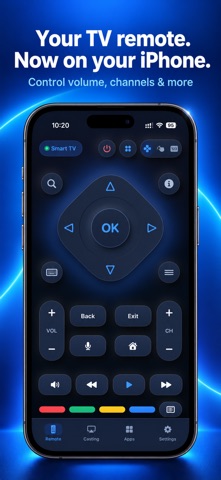
Your phone, as the remote your TV forgot to come with — and a way to put your photos, videos and whole screen on the big one while you are there. No account. No ads. Nothing to set up beyond being on the same Wi-Fi. A REAL REMOTE • D-pad, OK, back, home and menu • Volume, mute and channels • Number keys and the coloured buttons • Play, pause, rewind and fast-forward • Switch between HDMI, antenna and the other inputs • Type into TV search boxes with your phone's keyboard, instead of hunting letter by letter with the arrows • Voice search, on the TVs that support it • Open the streaming apps already installed on your TV, straight from your phone CAST FROM YOUR PHONE • Photos — send one to the TV and walk through the rest with the skip buttons • Videos — play your own clips with full play, pause and seek control SCREEN MIRRORING AND LIVE CAMERA • Mirror your entire display in real time — apps, games, anything on screen • Send your live camera to the TV Both of these need a television with Chromecast built in, or a Google TV. The app tells you so on those screens rather than failing quietly. The picture goes directly between your phone and your TV across your own Wi-Fi. ON YOUR WRIST A companion Apple Watch app for the keys you reach for most, for when the phone is in another room. SUBSCRIPTION TV Remote & Cast Premium unlocks every remote and every casting mode. • Weekly subscription, billed each week • Yearly subscription, billed each year • A weekly subscription with a free trial, where one is offered Prices are shown in the app, in your own currency, before anything is bought. Payment is charged to your Apple Account at confirmation of purchase. Subscriptions renew automatically unless auto-renew is turned off at least 24 hours before the end of the current period. Your account is charged for renewal within 24 hours of the end of the current period. You can manage or cancel your subscription in your Apple Account settings after purchase. Any unused portion of a free trial is forfeited when a subscription is purchased. Privacy Policy: https://contactzcodesystem.blogspot.com/p/privacy-policy-at-or-your-privacy-is.html Terms of Service: https://sites.google.com/view/appstermsofservice/home?authuser=1
Utilities · iPhone, iPad · Free