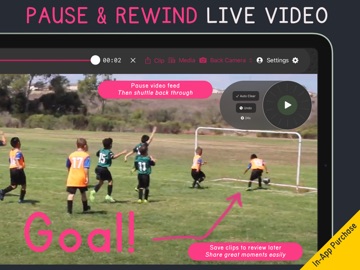
Make it obvious. Draw it. Draw over any video or your camera, pause where it matters and record what you mean, right on your iPad. MAKING VIDEOS Tutorials, reviews and walkthroughs, with your drawings and your voice together. No editing. COACHING Break down match footage and share it with the team. Put it on the TV at training, at half-time or in the team meeting, and show the whole squad what happened, and what should have. TEACHING Walk through a diagram, a worked example or an experiment, step by step. NEW: THE SOCCER TOOLKIT Made with coaches, from professional clubs to youth and grassroots teams. • Tap a player to number them. Press play and the number follows them. • Drag out the space a player is running into. • Link two defenders with a line that tracks them as the play continues. • Arrows for passes, runs and the path of the ball. An in-app subscription. TAKE PEOPLE THROUGH A VIDEO Load any video from your library, play or pause, and scrub to the perfect moment. Then just start drawing. Or switch to your iPad's camera, or a USB camera, and draw over it live. Record your drawings and your voice as a finished video, or as a transparent drawing layer to put over your own footage. DRAWING TOOLS CURATED FOR VIDEO Every tool is chosen to stand out clearly on top of moving pictures. Set up your favourite pens and colours so they're always one tap away. Every line responds to Apple Pencil's tilt and pressure. ACTION REPLAY Pause and rewind any live camera: your iPad's own camera, a USB camera or an NDI feed. Jog the Shuttle Wheel back to the moment and draw on it frame by frame, while the live feed keeps playing picture-in-picture. Save the best moments as clips. LIVE TITLES Draw a line, say what you want it to say, and your text appears, sized to fit your line. ON THE BIG SCREEN Put your iPad on a TV or projector with Apple TV, AirPlay or an HDMI adapter. The big screen shows only the footage and your drawings; the toolbar stays on your iPad. YOUR OWN BRANDING Make it look like your club, school or business on every screen. DRAW LIVE IN YOUR CALLS AND STREAMS Video Pencil connects to your Mac or PC for Zoom, Teams, Google Meet, OBS, Ecamm Live and mimoLive. With CueCam Presenter on your Mac, you draw on your iPad and everyone sees it over you, live. Video Pencil also connects over HDMI, AirPlay and USB, and sends and receives NDI, including a transparent NDI feed for Ecamm Live, OBS, mimoLive or your switcher. PART OF THE CUECAM SUITE Video Pencil works on its own, and pairs with CueCam Presenter for Mac and Shoot for iOS. A CueCam subscription includes Video Pencil's core features. FREE TO DOWNLOAD One-off upgrades are yours for life: remove the watermark, add Action Replay, or get Lifetime Updates for every current and future feature that isn't a subscription. “Best app out there for film day for coaching that isn't $600. Love it!” Coachfro25 “I cannot emphasise how amazing this app is. It's one that I use every day on my tutorials, client calls, and live streams.” Neil Farrimond, Creator Café “This has been my favorite tool (besides ecamm of course) of 2026! Proudly endorsed by the ecamm team!” Jill, Ecamm Facebook Community “I use Video Pencil connected via HDMI to a TV in the classroom for live game film review and I use the recording feature to create clips for the team or specific players. I could not do what I do without Video Pencil.” Echevarria Family Made by a single developer, working in public. Tell me what to build next at videopencil.com. NDI® is a registered trademark of Vizrt NDI AB. https://ndi.video
Photo & Video · iPhone, iPad · Free
Rating: 4.2 out of 5, based on 106 user ratings.