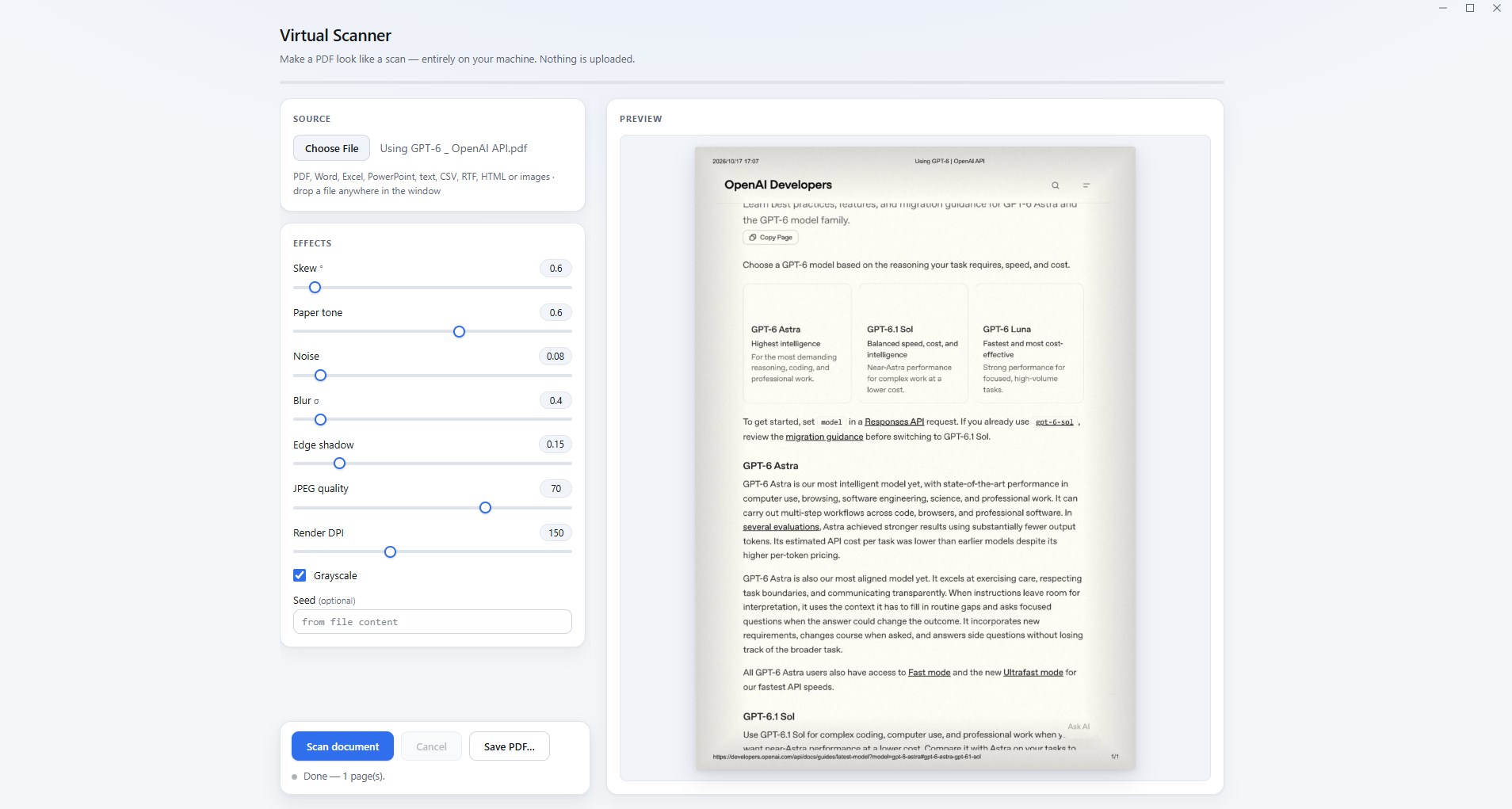
Virtual Scanner – PDF Scan Effects Turn Any Document into a Realistic Scanned PDF — No Scanner Required! Need to submit a scanned copy of a document but don't have a scanner? Virtual Scanner makes it easy to transform ordinary digital documents into realistic scanned-style PDFs in just a few clicks. Whether you're preparing paperwork, sharing documents, or creating scanned-looking copies for digital workflows, Virtual Scanner gives your files the natural appearance of documents processed by a physical scanner. No printer. No scanner. No cloud upload. Just your PC. CREATE REALISTIC SCANNED PDFS Transform regular digital documents into scanned-style PDFs with customizable visual effects. Choose from realistic scanning effects, including: Paper texture and warm paper tones Slight page rotation and skew Scanner noise and grain Soft focus and blur Natural edge shadows JPEG compression effects Grayscale scanning style Fine-tune the appearance to achieve the result you want. SUPPORTS MULTIPLE FILE FORMATS Import your documents and convert them into scanned-style PDF files. Supported input formats include: PDF Word documents Excel spreadsheets PowerPoint presentations Text and CSV files RTF and HTML files Images Non-PDF documents are converted to PDF locally before applying scan effects. REAL-TIME PREVIEW AND CUSTOMIZATION Take control of the final appearance with adjustable settings. Adjust page skew and rotation. Customize paper tone and scanning noise. Control blur and edge shadows. Set JPEG image quality. Choose rendering resolution from 72 to 300 DPI. Switch between color and grayscale. Preview pages individually before saving. You can see how your document will look before exporting it. PRIVATE AND OFFLINE BY DESIGN Your documents stay on your computer. No cloud uploads. No account registration. No external scanning service. No internet connection required for document processing. No additional printer drivers or external conversion tools required. Your files are processed locally, giving you greater control over your documents and privacy. SIMPLE AND EFFICIENT WORKFLOW Getting started is easy: Open a document or drag and drop a file. Customize the scanning effects. Preview the results page by page. Save your finished PDF. Keyboard shortcuts make everyday use even faster: Ctrl + O: Open a file Ctrl + S: Save your PDF Arrow keys: Navigate between pages DESIGNED FOR EVERYDAY DOCUMENT WORKFLOWS Virtual Scanner is useful when you need a scanned-style PDF without access to a physical scanner. Create scanned-looking document copies for digital workflows, document sharing, personal records, and other situations where a scanned visual appearance is useful. IMPORTANT: Virtual Scanner simulates the visual appearance of scanning. It does not perform physical scanning, OCR, document editing, or certify document authenticity. A simulated scan may not satisfy institutions that require an actual physical scan or certified copy. GET STARTED Skip the printer and scanner. Create realistic scanned-style PDFs directly on your Windows PC with Virtual Scanner.
Utilities · Windows · $3.99