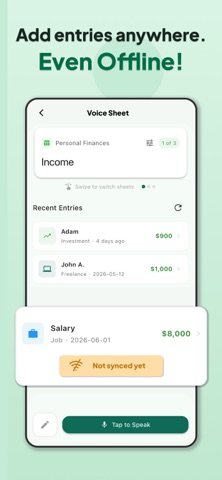
Say it, and it's a row in your own Google Sheet. Voice Sheet turns "I spent $20 on Netflix" into a complete entry with date, amount, category, payment method and notes, in the right spreadsheet and sorted by date. Voice is now free to try: 3 voice entries every day. Use Voice Sheet as a voice expense tracker, budget log, to-do list, habit tracker, work log or inventory manager, anywhere you'd rather talk than fight the Google Sheets mobile editor. FREE EVERY DAY • 3 voice entries a day • 1 widget or Quick Capture entry a day • Unlimited manual entries with forms built from your columns • All templates, offline entries with auto-sync, and reminders The free plan includes ads. PREMIUM • Unlimited voice entries • Unlimited Quick Capture and widget entries • Ask Anything (beta) • No ads NEW: ASK ANYTHING (PREMIUM, BETA) • Speak several entries at once and review them as drafts • Fix them by voice before you add them • Ask about your entries and get totals and charts: "Chart this month against last month" SPEAK NATURALLY, GET STRUCTURED DATA • Voice listens in your language and waits when you pause to think • AI turns plain speech or text into formatted spreadsheet rows • Picks the closest match from your category and payment method lists • Fills in dates, amounts and notes, with no forms to tap through • Teach the AI with explanations per column or category (for example, "Card is my default payment method") so it matches how you talk QUICK CAPTURE: MANY ENTRIES AT ONCE • One large notes-style box: write or dictate several entries in plain words or bullet points • Voice Sheet extracts every entry and adds each as its own row • Open it straight from a home screen widget • Drafts stay on your device, even offline, until you're connected WORKS WITH THE SHEETS YOU ALREADY HAVE • Connect any Google Sheet: Voice Sheet reads your headers and adapts • Date columns get a calendar, number columns a numeric keypad, list columns a dropdown • Change formats, add list items, mark columns as required and swap columns in the app • Backdated entries land in the correct date order • Edit and delete entries from the app READY-MADE TEMPLATES • Personal Finances: income, expenses and a budget dashboard • Tasks • Project Management • Habit Tracker • Inventory • Work Log • Health & Fitness REMINDERS FOR RECURRING ENTRIES • One-time or recurring reminders for subscriptions, bills and habits • Turn any past entry into a repeating reminder • Tap the notification and the entry is prefilled, so you only confirm • Missed one? It waits on your home screen WORKS OFFLINE, SYNCS LATER • Forms work with no signal; entries queue and sync automatically (voice needs a connection) • Full offline mode with no Google account • Choose where your data lives: on your device only, restricted Google Drive access (only files Voice Sheet creates), or full Drive access Available in English, German, Spanish, French, Hungarian, Italian, Portuguese and Russian. YOUR DATA Your entries live in your own Google Sheets, always exportable. Voice Sheet uses Google's Gemini AI to read your entries. It receives text for standard voice entries and Quick Capture, and the audio recording for Ask Anything and the voice try-out during setup. Premium is an auto-renewing subscription billed through your Apple account. It renews unless canceled at least 24 hours before the current period ends. Manage or cancel it in your App Store account settings. Voice Sheet requires a Google account for online mode. Offline mode works without any account. Learn more at voicesheet.app Terms of Use: https://www.apple.com/legal/internet-services/itunes/dev/stdeula/ Privacy Policy: https://www.voicesheet.app/privacy
Productivity · iPhone, iPad · Free
Rating: 2.0 out of 5, based on 1 user ratings.