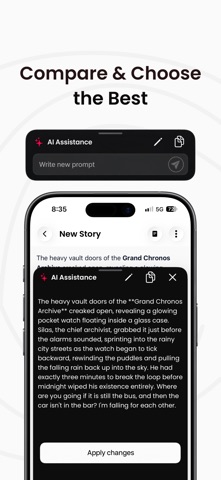
VoiceToNotes AI is an advanced AI transcription, speech-to-text, and voice dictation app designed for meetings, lectures, interviews, productivity workflows, and professional note-taking. Instantly convert speech into accurate, structured transcripts using powerful AI speech recognition and smart formatting tools. Transcribing meetings, capturing classroom lectures, recording interviews, brainstorming ideas, creating content, or using hands-free voice typing, VoiceToNotes AI helps you save time and improve productivity with fast and reliable speech transcription. AI TRANSCRIPTION & SPEECH TO TEXT Convert spoken words into clean and organised text instantly with advanced AI-powered speech recognition. • Real-time AI transcription • Fast speech-to-text conversion • Accurate voice typing and dictation • High accuracy across different accents • Smooth and responsive transcription experience • Hands-free productivity tools VoiceToNotes AI is built for professionals, students, creators, writers, teams, and productivity-focused users who need fast and accurate voice transcription. MEETING TRANSCRIPTION & LECTURE NOTES Capture important conversations and organise them into professional transcripts instantly. • AI meeting transcription • Lecture transcription and study notes • Interview transcription • Voice memos and spoken reminders • Brainstorming and idea capture • Business discussions and work notes • Podcast and content planning SMART FORMATTING & ORGANIZED TRANSCRIPTS Unlike basic voice typing apps, VoiceToNotes AI automatically formats transcripts into clean and readable text. • Smart punctuation and formatting • Organised paragraphs and structured notes • Easy-to-read transcripts • Clean formatting for meetings and lectures • Faster editing and note organisation • Ready-to-share transcript formatting AI WRITING & TRANSCRIPT TOOLS Improve and refine transcripts instantly using built-in AI writing features. • Rewrite and improve text • Summarise long transcripts • Improve grammar and sentence clarity • Change writing tone and style • Turn rough transcripts into polished notes • Create professional content faster VOICE DICTATION & VOICE TYPING Use VoiceToNotes AI as a fast and reliable AI dictation tool for productivity and content creation. • Fast voice typing experience • AI-powered dictation tools • Speak naturally and capture ideas instantly • Great for notes, writing, and drafts • Easy speech input for productivity workflows PHOTO TO TEXT (OCR) Extract text from images, screenshots, and documents instantly. • Convert photos into editable text • OCR image-to-text extraction • Capture text from screenshots and documents • Copy and edit extracted text easily MULTI-LANGUAGE TRANSCRIPTION VoiceToNotes AI supports multiple languages for speech recognition and transcription. • Accurate multilingual transcription • Great for global users and professionals • Multi-language voice typing and dictation EXPORT & SHARE Save and share transcripts easily across your workflow. • Copy transcripts instantly • Export notes and transcripts • Share text quickly with apps and teams • Access saved transcripts anytime PRIVACY & SECURITY Your recordings and transcripts stay secure. • Full control over your data • No hidden syncing • Reliable and secure speech processing WHO IS VOICETONOTES AI FOR? • Professionals and remote teams • Students and researchers • Writers, creators, and bloggers • Journalists and interviewers • Productivity and business users WHY CHOOSE VOICETONOTES AI? • Accurate AI transcription • Fast speech-to-text conversion • AI dictation and voice typing • Smart transcript formatting • AI writing and summary tools • OCR photo-to-text support • Multi-language speech recognition • Productivity-focused workflow tools SUBSCRIPTIONS & TERMS • Privacy Policy: https://voicetonotes.ai/privacy-policy/ • Terms of Use (EULA): https://voicetonotes.ai/terms/
Productivity · iPhone, iPad · Free
Rating: 3.9 out of 5, based on 14 user ratings.