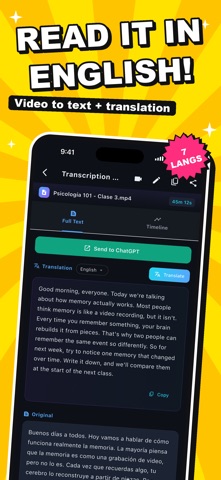
Want to read a lecture or class video instead of rewatching it? Pick the video in Voxcribe and the audio becomes text — with a translation into your language. Missed something? Tap any line and the video plays from that exact moment. Even a long lecture becomes something you can skim. --- Perfect For --- - Reviewing a lecture you took in another language, in your own - Checking what was said in a recorded meeting or seminar - Learning a language by comparing the original and the translation - Getting a first draft for video subtitles --- Key Features --- - Transcribe a video just by picking it (English, Japanese, Chinese, Korean, Spanish, French, German) - Translation into 7 languages, for the full text or line by line - Timeline view that plays the video in sync with the text - Edit, copy and share the text, or send it to other apps - Organize transcripts into folders by class or project --- Privacy --- - Transcription runs on your device first. When that isn't possible, it uses Apple's speech recognition service - Your videos stay on your device and are never sent to the developer's servers - Translation uses Apple's translation feature (offline use needs the language downloaded) --- What It Can't Do --- - Accuracy drops with unclear audio or a lot of background noise. It's made for getting the content — reviewing lectures, learning languages — rather than word-perfect minutes --- Pricing --- Free plan: Transcription up to 3 minutes Pro plan: Unlimited transcription + translation (monthly auto-renewal) Subscriptions are charged to your Apple ID. Auto-renews unless cancelled at least 24 hours before the end of the current period. Cancel anytime in Settings > Apple ID > Subscriptions. Privacy Policy: https://fillapps.com/privacy/ Terms of Use (EULA): https://www.apple.com/legal/internet-services/itunes/dev/stdeula/
Utilities · iPhone, iPad · Free