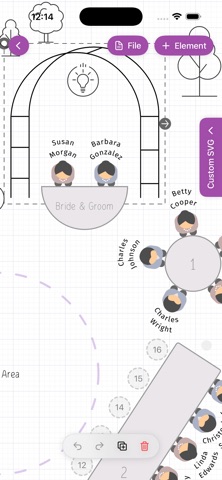
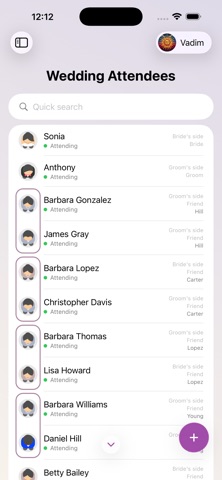
Wedding Planner AI Assistant is the wedding seating chart maker that grew into an all-in-one wedding planning app. Draw the reception floor plan, seat every guest by drag & drop or in one tap with automatic seating, print the table plan for the venue — then manage the guest list and RSVPs, checklist, budget and timeline in the same project, with your partner, family or a professional wedding planner, on iPhone, iPad and the free web app at planning.wedding. NEW: AUTOMATIC SEATING • One button seats your whole guest list in a second — by role, closest to the couple first • The maid of honor and best man take the couple's sides, then the wedding party, parents, relatives and friends • Families always sit together, at one table • Fill the free seats or reseat everyone; the whole seating plan is one Undo away • Then add the final polish: drag a guest onto another guest to swap them, or onto a free seat to move them RECEPTION SEATING CHART • Tables of any shape — round, banquet, long rectangular, square, curved and custom — with the seats you need • The head table or sweetheart table, a dance floor, stage, bar, buffet, trees and décor; rulers to check the real distances • Drag & drop guests onto seats, number seats and tables automatically, hide empty seats, rotate and resize tables with two fingers • Guest train: the next guests to seat wait beside the chart — drag them onto a table or a seat • Swap seated guests with one drag; undo and redo every step; duplicate tables • Meal choices and dietary needs shown on the seating plan for the caterer CEREMONY SEATING • Rows of chairs with an aisle and the wedding arch — the same guests, the same drag & drop • The ceremony layout lives next to the reception layout in one project TABLE PLAN TO PRINT • Print-ready PDF in poster sizes: the seated table plan, an empty floor plan, a catering plan with every meal, per-table details and the guest list by table • Share it with the venue, the caterer and your wedding planner in one tap GUEST LIST & RSVP • Track invitations, RSVPs, meals and dietary needs; design digital invites with the free wedding invitation maker on the web • Import guests from a spreadsheet with AI assistance — names, families and roles are recognized for you • Collect responses online through your wedding website and see them instantly • Group guests by family, side and role: bride, groom, parents, bridesmaids, groomsmen, friends • Export the guest list as PDF or XLS CHECKLIST, BUDGET & TIMELINE • Wedding checklist templates, month by month, plus a wedding countdown on your free wedding website • Budget calculator: planned and actual costs by category, payments, due dates and who pays • Event itinerary for the wedding day: ceremony, reception, speeches, first dance, minute by minute • Venues and vendors: dates, locations, weather for the date, contacts, notes and photos on one line PLAN TOGETHER • Real-time sync between iPhone, iPad and the web app — every change appears everywhere instantly • Invite family, friends or your planner to collaborate — no account needed for guests • Share a link or a QR code; a wedding planner can manage several weddings from one account AND MORE • Overview: an infographic of the whole celebration — guests, budget, timeline and progress at a glance • Use a wedding photo QR code on the web to collect guests' pictures in your album; save notes for speeches and vows • Not only weddings: birthdays, anniversaries, corporate events and any party with a table plan • Multiple languages, Sign in with Apple • Free to start — no sign-up required The free web app at planning.wedding also creates your wedding website, place cards, escort cards, table numbers, menus, welcome signs and programs — all from the same guest list and seating chart. Your projects are securely stored in the cloud and instantly synced across devices. The planning tools are free; Premium unlocks print-ready exports and extra features.
Lifestyle · iPhone, iPad, Android · Free
Rating: 5.0 out of 5, based on 5 user ratings.