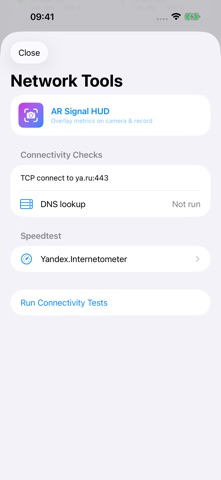
WiFi Prober is a network diagnostic utility for engineers and IT professionals performing Wi-Fi surveys on iPhone. WI-FI SURVEYS - View RSSI, noise, Rx/Tx Data Rate and connection details supplied by the companion Apple Shortcut. - Follow BSSID roaming events and channel changes. - View estimated channel width and MCS, with the assumptions available in the app. - Arrange dashboard blocks in Settings and keep your preferred order. - Save long surveys and export the current or a previous survey as CSV. NETWORK TOOLS - Measure TCP connection time to your Wi-Fi gateway and external hosts, with IPv4/IPv6 support and custom targets. - Check DNS resolution time. - Run the embedded Yandex Internetometer speed test in a temporary web session with known advertising and analytics requests blocked. - Identify equipment vendors using an offline OUI database. AR SIGNAL HUD Overlay available signal measurements and equipment information on the camera view. Record and preview video during a site survey. SETUP AND COLLECTION Wi-Fi signal measurements require the WiFi Monitor Agent 2 companion Shortcut. Install and verify it in Settings → Wi-Fi Shortcut. Network Tools are available without installing the Shortcut. Collection runs while WiFi Prober is active. Leaving, locking or closing the app stops collection; press Start to begin again. A fresh launch or a return after two hours away clears old dashboard readings, while saved surveys remain available for export. No WiFi Prober account is required.
Utilities · iPhone, iPad · Free
Rating: 5.0 out of 5, based on 2 user ratings.