
Screenshots



About Wspr — Meeting Notes
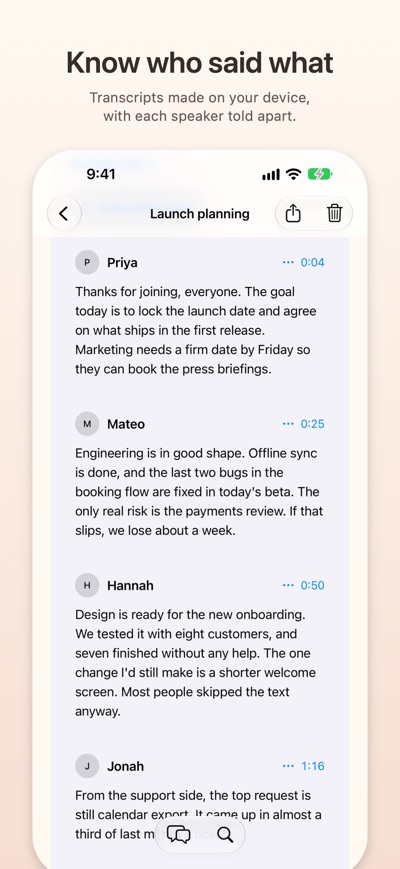
Wspr records your meetings and turns them into notes you can trust. Transcripts and recaps are made on your device, and every point links back to the moment it was said.
RECORD
• Start a recording in one tap, or from the meeting on your calendar.
• On Mac, capture your microphone and your Mac's audio together, so both sides of a call end up in the transcript.
• Import audio files you already have.
TRANSCRIBE ON YOUR DEVICE
• Transcription runs on your iPhone, iPad or Mac, using Apple's on-device speech recognition or speech models you download.
• Wspr tells speakers apart, and you can give each one a name.
• Correct any line of the transcript; your edits are kept.
RECAPS WITH SOURCES
• Make a recap with a summary, decisions and action items.
• Every point quotes the transcript and opens the exact moment it came from.
• Your notes guide which points the recap keeps.
ASK ABOUT ANY MEETING
• Ask a question about a conversation. Answers quote the transcript, so you can check them.
• Use a model downloaded to your device, Apple Intelligence on supported devices, or an Ollama server you run yourself.
FIND ANYTHING
• Search every conversation by title or by what was said.
• Export any meeting as Markdown.
READY FOR YOUR NEXT MEETING
• See upcoming meetings from your calendar and get a reminder to record before they start. Wspr reads your calendar and never changes it.
PRIVATE BY DESIGN
• No account, no ads, no analytics.
• Meetings stay on your devices. Sync them through your own private iCloud, a folder you choose, your Jottacloud account or your Mac over your local network, or keep them on one device.
• On Mac, AI apps you use can read meetings through a local MCP connection, only for the meetings you allow.
AVALW Coverage
Not yet mentioned in AVALW articles.
Similar apps


 MyJio: For Everything JioJio Platforms LimitedTrue 5G, recharges, payments & UPI, music & movies, backup, games, news & more.★ 4.4 27428k


 Microsoft WordMicrosoft CorporationThis application requires a qualifying Microsoft 365 subscription. Microsoft 365 includes premium Word, Excel, and PowerPoint apps, 1 TB cloud storage in OneDri★ 4.8 17535k



 Samsung NotesSamsung Electronics Co, Ltd.(Samsung Notes is optimized for Samsung Galaxy Books. Other computers may have issues running it.) "Samsung Notes allows you to use the enhanced S Pen to write ★ 4.8 15228k



 ChatGPT ClassicOpenAIThe official ChatGPT desktop app brings you the newest model improvements from OpenAI. Do more on your PC with ChatGPT: · Instant answers—Use the [Alt + Space] ★ 4.8 11034k


 ChatGPTOpenAI OpCo, LLCIntroducing ChatGPT for iOS: OpenAI’s latest advancements at your fingertips. This official app is free, syncs your history across devices, and brings you the l★ 4.8 11034k


 Microsoft OutlookMicrosoft CorporationOutlook helps you stay connected and organized at the office and at home with easy access to emails, files, calendar events, and contacts across all your accoun★ 4.3 10673k


 Turbo VPN: Unlimited VPN ProxyINNOVATIVE CONNECTING PTE.LIMITEDDo you want online security and privacy while browsing? Turbo VPN now provides the fastest, reliable and encrypted network. With Turbo VPN, you can get the safe★ 4.7 10243k



 Microsoft ExcelMicrosoft CorporationThis application requires a qualifying Microsoft 365 subscription. Microsoft 365 includes premium Word, Excel, and PowerPoint apps, 1 TB cloud storage in OneDri★ 4.8 9702k
More by this developer


 Tidy LiteCristian Camilo Arias BoteroTidy Lite shows where your Mac's storage went. It finds the space that old macOS installs and developer tools leave behind, and helps you take it back, one step-


 Kaffe TimeCristian Camilo Arias BoteroKaffe Time is a newspaper that lives on your phone. Follow the papers and topics you choose and read them together on one front page, with no account and no alg-


 KobitoCristian Camilo Arias BoteroKobito runs a crew of AI agents side by side on your iPhone, iPad and Mac. Empty your head: each task gets its own lane, they all start at once, and anything th-


 The Browser - Private AICristian Camilo Arias BoteroThe Browser is a fast, private web browser with a built-in AI that runs entirely on your device — no account, no data collection, no tracking. PRIVATE BY DEFAUL★ 5.0 2