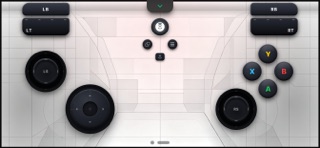
Turn your smartphone into a fully-functional, ultra-low-latency wireless gaming controller for Windows PC! Whether you want to play the latest AAA titles on Steam, dive into classic retro games on Windows Emulators, or simply need a backup gamepad, [App Name] has you covered. By supporting both XInput and DInput protocols, it perfectly emulates an official Xbox Controller, giving you the ultimate gaming experience without buying extra hardware. Key Features: Full Xbox Emulation: Fully compatible with any PC game that supports Xbox controllers, including Windows Store and Steam games. XInput & DInput Support: Seamlessly switch between modern XInput and classic DirectInput protocols to support both modern titles and retro emulators. mDNS Auto-Discovery: No manual IP typing required. Fire up the server on your PC, open the app, and connect instantly over your local Wi-Fi. Fully Customizable Layout: Don’t like the default setup? Resize, reposition, and rebind every button, D-pad, and analog stick to fit your hands perfectly. Lag-Free Performance: Optimized network protocols ensure snappy response times and competitive, low-latency gaming. Perfect For: PC Gamers: Use it as a player-2 controller for couch co-op. Emulator Enthusiasts: Perfect for RetroArch, PCSX2, RPCS3, Dolphin, and other Windows emulation software. Gamers on the Go: Play your PC games anywhere in the house.
Utilities · iPhone, iPad · $4.99