
Screenshots




About Book Scanner - Scan to Text
Book Scanner turns the pages of a printed book into text you can read on your phone. Point the camera at a page: the words are recognized on the device and added to a book in your library. Pages flow together into chapters, so what you scanned reads like an e-book, not a stack of photos.
SCAN THE WAY YOU READ
• A guide frame shows what will be captured; text and image capture on the same screen
• Recognition runs on the device; nothing is uploaded
• Headers, footers and page numbers are removed; paragraphs that continue on the next page are joined
• Choose the recognition language per book
• Photograph the cover and the title is picked up from it
• The screen stays on while you scan
READ, DON'T SQUINT
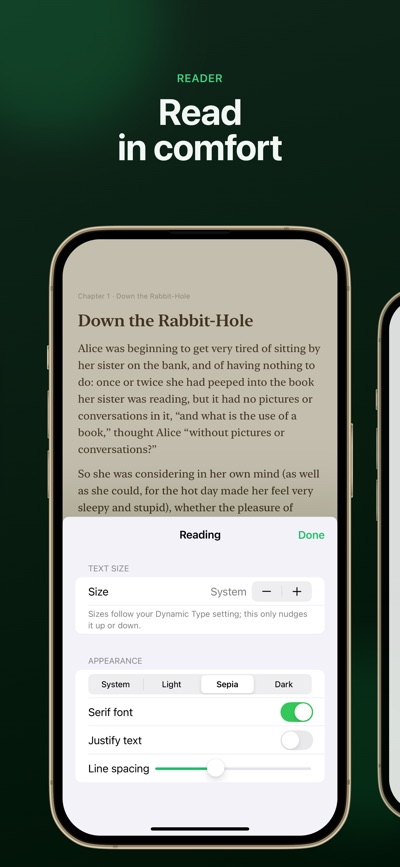
• Page-turn reader with adjustable text size, serif or sans-serif type, line spacing, and light, sepia and dark themes
• Search the whole book: every match with its chapter and context, marked on the page
• Text follows your Dynamic Type setting
• Two-page spread on iPad
• Your place in every book is remembered
TYPE ALONG (LABS)
• An experimental feature: turn it on in Settings › Labs
• Copy a book by typing it, one paragraph at a time, in the same type and theme as the reader
• Every right character fills in and a mistake shows in red, so you see exactly where you slipped
• Speed and accuracy as you type; pick up where you left off
• Korean and other input methods compose in place
KEEP EVERYTHING TOGETHER
• Library with list and grid views, search by title and author, sort by recently added or recently read
• On iPad, a sidebar with Recently Read, Currently Reading and Finished, and the book beside your shelf
• Reading progress on every book
• iCloud sync between your iPhone, iPad and Mac (optional)
• Highlight sentences and add notes; find them again in the book's index
• See any book as a PDF, highlights included
BOOK SCANNER PRO
Pro unlocks unlimited books and OCR with no page limit, Auto Scan that adds pages as you turn them, PDF export with your highlights, and editing of recognized text. Available as a yearly or monthly subscription or a one-time Lifetime purchase; one purchase covers iPhone, iPad and Mac.
PRIVACY
Your scans stay on your device and, if you turn on sync, in your own iCloud. Book Scanner has no accounts, no ads and no tracking.
Subscriptions renew automatically unless cancelled at least 24 hours before the end of the current period. Payment is charged to your Apple Account; manage or cancel your subscription in your App Store account settings.
Terms of Use: https://www.apple.com/legal/internet-services/itunes/dev/stdeula/
Privacy Policy: https://layerz.app/bookscanner/privacy
AVALW Coverage
Not yet mentioned in AVALW articles.
Similar apps


 MyJio: For Everything JioJio Platforms LimitedTrue 5G, recharges, payments & UPI, music & movies, backup, games, news & more.★ 4.4 27428k


 Microsoft WordMicrosoft CorporationThis application requires a qualifying Microsoft 365 subscription. Microsoft 365 includes premium Word, Excel, and PowerPoint apps, 1 TB cloud storage in OneDri★ 4.8 17535k



 Samsung NotesSamsung Electronics Co, Ltd.(Samsung Notes is optimized for Samsung Galaxy Books. Other computers may have issues running it.) "Samsung Notes allows you to use the enhanced S Pen to write ★ 4.8 15228k



 ChatGPT ClassicOpenAIThe official ChatGPT desktop app brings you the newest model improvements from OpenAI. Do more on your PC with ChatGPT: · Instant answers—Use the [Alt + Space] ★ 4.8 11034k


 ChatGPTOpenAI OpCo, LLCIntroducing ChatGPT for iOS: OpenAI’s latest advancements at your fingertips. This official app is free, syncs your history across devices, and brings you the l★ 4.8 11034k


 Microsoft OutlookMicrosoft CorporationOutlook helps you stay connected and organized at the office and at home with easy access to emails, files, calendar events, and contacts across all your accoun★ 4.3 10673k


 Turbo VPN: Unlimited VPN ProxyINNOVATIVE CONNECTING PTE.LIMITEDDo you want online security and privacy while browsing? Turbo VPN now provides the fastest, reliable and encrypted network. With Turbo VPN, you can get the safe★ 4.7 10243k



 Microsoft ExcelMicrosoft CorporationThis application requires a qualifying Microsoft 365 subscription. Microsoft 365 includes premium Word, Excel, and PowerPoint apps, 1 TB cloud storage in OneDri★ 4.8 9702k
More by this developer


 Layerz CanvasLayerz Corp.Layerz Canvas turns a design into a promo video without leaving the document — on iPhone and iPad, with the same files as the Mac app. DESIGN Rectangles, ellips-


 days - Your Private Day FeedLayerz Corp.days is a social feed only you can see. It looks like the feeds you know, but every post is yours. The photos, videos, calendar events and to-dos from Reminders-


 LunarLayerz Corp.Lunar는 오늘의 음력 날짜를 한눈에 확인하고, 캘린더에 음력 이벤트를 생성할 수 있는 앱입니다. 맥에서 음력 생일이나 기념일 등 관리가 어려웠던 부분을 해결할 수 있습니다. 1. 오늘의 음력 앱을 열면 오늘의 음력 날짜를 큰 숫자로 바로 확인할 수 있습니다. 실제 달의 모양과 함께 -


 Subtitle Anything - CaptionsLayerz Corp.Captions for every voice. Subtitle Anything turns speech into live subtitles on your screen: your own voice, the person in front of you, and now the videos, liv-