
Screenshots



About Pad Notes AI: Note Taking
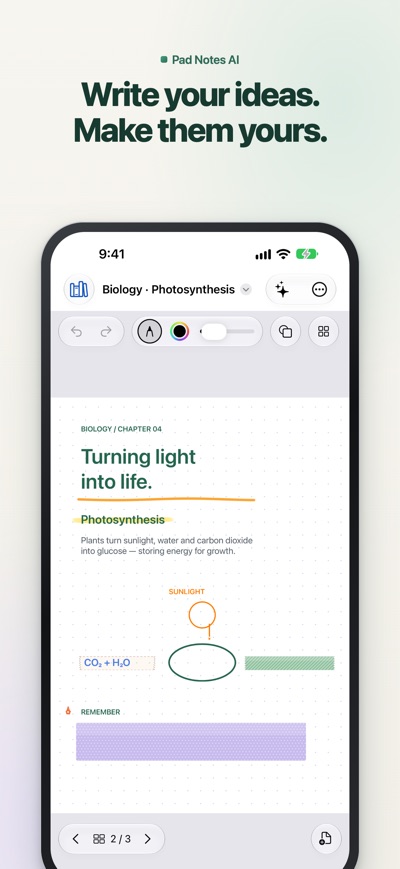
Handwrite, type, annotate PDFs and study in one notebook on iPhone, iPad and Mac. Pad Notes AI pairs a natural Apple Pencil experience with memorization tape and an AI assistant that works from your own notes.
WRITE AND CREATE
Write with Apple Pencil on compatible iPads or draw with touch. Adjust ink and stroke size, highlight, add text and images, and hold a stroke to turn it into an editable shape. Erase whole strokes or just part of them.
STUDY WITH MEMORIZATION TAPE
Cover definitions, formulas or answers with straight, box or freehand tape in eight patterns and colors. Try to recall them, then tap the tape to peel it back. Cover All and Reveal All turn any page into a quick self-test.
MAKE EACH NOTEBOOK YOURS
Choose from 15 cover styles, 19 page templates and 12 paper colors. Use ruled, dotted, grid, Cornell, planner, music and reading journal pages. Organize notebooks in folders, pin favorites, search your notes, and import or export PDFs.
WORK WITH YOUR NOTES
Record audio, use transcription and translation, and ask the assistant to summarize, explain or create study questions from selected pages. Apple on-device AI requires a supported device with Apple Intelligence available. Online AI requires your own provider API key and an internet connection. The basic offline mode extracts text and keywords using rules.
Start with up to 20 notebooks for free. A one-time lifetime purchase unlocks unlimited notebooks. iCloud sync uses your device's Apple Account and requires iCloud to be available.
AVALW Coverage
Not yet mentioned in AVALW articles.
Similar apps


 MyJio: For Everything JioJio Platforms LimitedTrue 5G, recharges, payments & UPI, music & movies, backup, games, news & more.★ 4.4 27428k


 Microsoft WordMicrosoft CorporationThis application requires a qualifying Microsoft 365 subscription. Microsoft 365 includes premium Word, Excel, and PowerPoint apps, 1 TB cloud storage in OneDri★ 4.8 17535k



 Samsung NotesSamsung Electronics Co, Ltd.(Samsung Notes is optimized for Samsung Galaxy Books. Other computers may have issues running it.) "Samsung Notes allows you to use the enhanced S Pen to write ★ 4.8 15228k



 ChatGPT ClassicOpenAIThe official ChatGPT desktop app brings you the newest model improvements from OpenAI. Do more on your PC with ChatGPT: · Instant answers—Use the [Alt + Space] ★ 4.8 11034k


 ChatGPTOpenAI OpCo, LLCIntroducing ChatGPT for iOS: OpenAI’s latest advancements at your fingertips. This official app is free, syncs your history across devices, and brings you the l★ 4.8 11034k


 Microsoft OutlookMicrosoft CorporationOutlook helps you stay connected and organized at the office and at home with easy access to emails, files, calendar events, and contacts across all your accoun★ 4.3 10673k


 Turbo VPN: Unlimited VPN ProxyINNOVATIVE CONNECTING PTE.LIMITEDDo you want online security and privacy while browsing? Turbo VPN now provides the fastest, reliable and encrypted network. With Turbo VPN, you can get the safe★ 4.7 10243k



 Microsoft ExcelMicrosoft CorporationThis application requires a qualifying Microsoft 365 subscription. Microsoft 365 includes premium Word, Excel, and PowerPoint apps, 1 TB cloud storage in OneDri★ 4.8 9702k
More by this developer


 LunarV: Lunar Calendar Âm LịchHung Tien PhamLunarV is a clear, accurate Vietnamese lunar calendar and almanac (âm lịch) for iPhone, iPad, Mac and Apple Vision Pro. See lunar dates and lucky hours, pick go-


 vTTS: Offline Text to SpeechHung Tien PhamMake time for the books you love, even when your eyes need a break. vTTS reads books and text aloud on iPhone, iPad and Mac, with voices built into the app and -


 Lunar Block - Teris 3DHung Tien PhamLunar Block transforms the classic falling-block puzzle into a cinematic 3D orbital arena for iPhone, iPad, and Mac. Stack, rotate, hold, and drop crystal block-


 My NAS ManagerHung Tien PhamMy NAS Manager puts your Synology NAS in your pocket. Check its health, work with your files and manage downloads from iPhone and iPad. OVERVIEW • Live CPU, mem-