
Screenshots
About MPP & XER Viewer - Gantt Chart & Schedule
Got a .mpp or .xer schedule but no Microsoft Project or Primavera P6? Open it in seconds, compare two versions to see exactly what changed, and check its quality against the DCMA 14-point assessment.
MPP & XER Viewer and Compare is a fast viewer for project schedules, with comparison, quick edits and a quality check. Subcontractors, clients, engineers, schedulers and team members can review a plan sent to them – without buying or installing Microsoft Project or P6.
WHAT YOU CAN SEE
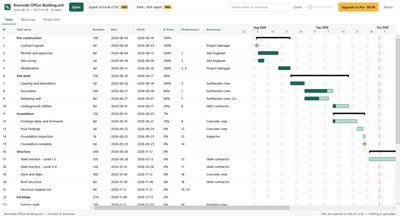
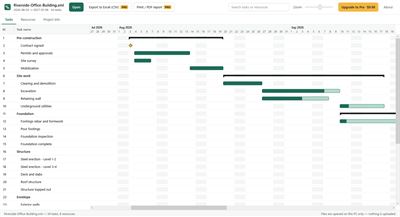
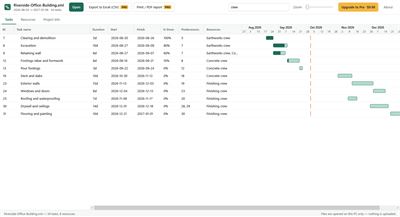
• Task table: outline levels, durations, start and finish dates, % complete, predecessors (FS/SS/FF/SF with lag) and assigned resources
• Gantt chart: task bars with progress, summary bars, milestones, weekends and a today line
• Zoom from months down to single days
• Search tasks and resources instantly
• Resources tab and project information tab
COMPARE TWO SCHEDULE VERSIONS
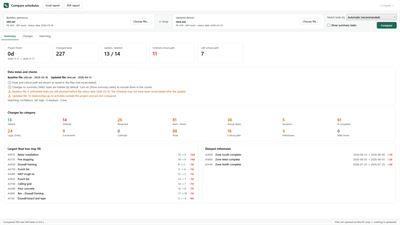
Received this month's update? Drop last month's file and this month's file side by side and see exactly what changed.
• Works across formats: MPP vs XER, MS Project XML vs P6 XML, and more
• XER (Primavera P6) comparison is in beta – check key results against P6 before you submit, and let us know if anything differs
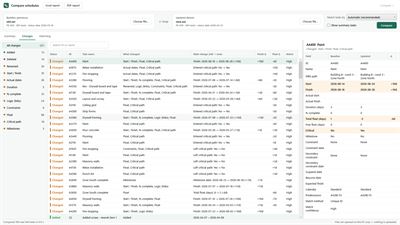
• Pairs activities even when the files come from different sources (re-exports, conversions), using IDs, WBS path and names – every pair shows how it was matched and how confident the match is
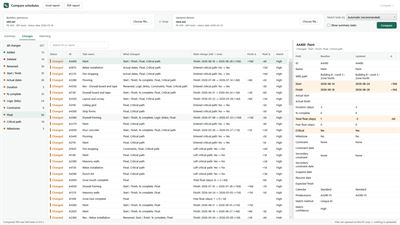
• Finds added and deleted activities, renames, start/finish and actual date moves, duration and % complete, logic changes (links, type, lag), constraints, calendars, total/free float, critical path entries and exits, milestone slips and WBS moves
• Summary dashboard: project finish change, float loss top 10, delayed milestones, data-date checks
• Excel workbook and printable PDF report for your monthly update narrative or review submittal
EDIT AND SAVE
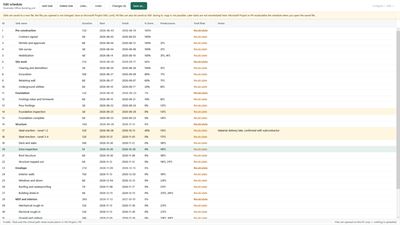
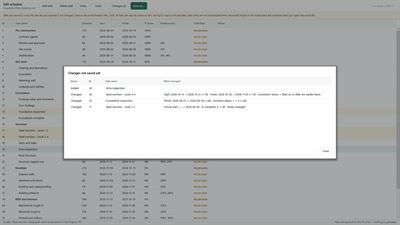
Make quick fixes without Microsoft Project or P6: rename tasks, change start, finish, duration and % complete, add notes, add or delete tasks, and add or remove links (FS, SS, FF, SF with lag). Every edit can be undone, and a change list shows what you changed before you save. Edits are saved to a new Microsoft Project XML (.xml) file; P6 files can also be saved as XER. The file you opened is never changed.
Limits: saving to .mpp is not possible. Changing a date does not reschedule later tasks or recalculate float — Microsoft Project or Primavera P6 recalculates the schedule when you open the saved file (P6: F9). A moved start keeps a "start no earlier than" constraint so it stays where you put it. Bar styles and view settings are not saved.
SCHEDULE QUALITY CHECK (DCMA 14-POINT) – new
Open an XER or MPP file and check it against the 14 points of the DCMA schedule assessment: logic, leads, lags, relationship types, hard constraints, high and negative float, high duration, invalid dates, resources, missed tasks, critical path, CPLI and BEI. Each check shows its value, the DCMA limit and pass or fail; checks that need a status date, a baseline or resources the file does not have are marked "not checked" with the reason instead of failing. Click a check to list the activities behind it and jump to them in the Gantt chart, change the limits to your contract's, and save an Excel or PDF quality report.
Limits: float and the critical path are read as stored in the file; nothing is recalculated, so the critical path test is a simple check of the stored critical path, not the formal "add a delay and recalculate" test. For P6 files the baseline is the planned dates stored in the file. DCMA is named only to describe the assessment; this app is not affiliated with DCMA.
PRIVATE BY DESIGN
Your files are opened only on your PC. Nothing is uploaded to any server – useful for confidential construction and engineering schedules.
FREE TO VIEW, UPGRADE WHEN YOU NEED IT
Viewing is free with no time limit. Comparing is free for summary counts and the top 10 changes. Every edit can be tried for free; saving edits needs the subscription. The quality check is free for every check's pass/fail and the overall score.
• Pro (one-time purchase): export to Excel (CSV) and a printable report with the Gantt chart (print it or save as PDF)
• Compare + Edit + Quality Check subscription – $99.99 a year or $12.99 a month, 1-week free trial: full change list, Excel and PDF change reports, saving edits, the quality check's flagged activities, your own limits and quality reports, and all Pro features
SUPPORTED FILES
Microsoft Project .mpp (Project 98 through Project 2024), .mpt, .mpx and Microsoft Project XML; Primavera P6 .xer and P6 XML.
Microsoft Project is a trademark of Microsoft Corporation. Primavera is a trademark of Oracle. This app is not affiliated with or endorsed by Microsoft or Oracle.
AVALW Coverage
Not yet mentioned in AVALW articles.
Similar apps


 MyJio: For Everything JioJio Platforms LimitedTrue 5G, recharges, payments & UPI, music & movies, backup, games, news & more.★ 4.4 27428k


 Microsoft WordMicrosoft CorporationThis application requires a qualifying Microsoft 365 subscription. Microsoft 365 includes premium Word, Excel, and PowerPoint apps, 1 TB cloud storage in OneDri★ 4.8 17535k



 Samsung NotesSamsung Electronics Co, Ltd.(Samsung Notes is optimized for Samsung Galaxy Books. Other computers may have issues running it.) "Samsung Notes allows you to use the enhanced S Pen to write ★ 4.8 15228k



 ChatGPT ClassicOpenAIThe official ChatGPT desktop app brings you the newest model improvements from OpenAI. Do more on your PC with ChatGPT: · Instant answers—Use the [Alt + Space] ★ 4.8 11034k


 ChatGPTOpenAI OpCo, LLCIntroducing ChatGPT for iOS: OpenAI’s latest advancements at your fingertips. This official app is free, syncs your history across devices, and brings you the l★ 4.8 11034k


 Microsoft OutlookMicrosoft CorporationOutlook helps you stay connected and organized at the office and at home with easy access to emails, files, calendar events, and contacts across all your accoun★ 4.3 10673k


 Turbo VPN: Unlimited VPN ProxyINNOVATIVE CONNECTING PTE.LIMITEDDo you want online security and privacy while browsing? Turbo VPN now provides the fastest, reliable and encrypted network. With Turbo VPN, you can get the safe★ 4.7 10243k



 Microsoft ExcelMicrosoft CorporationThis application requires a qualifying Microsoft 365 subscription. Microsoft 365 includes premium Word, Excel, and PowerPoint apps, 1 TB cloud storage in OneDri★ 4.8 9702k
More by this developer

 PES & DST Embroidery Viewer - Open, Print & ConvertSoyaToolsLook inside your embroidery design files on your PC — no machine software, no account, nothing uploaded. Open and view (free) • Opens .pes (all versions we coul-
 SAV & DTA File Viewer - Open & Save as ExcelSoyaToolsGot a .sav or .dta file but no SPSS or Stata licence? SAV & DTA File Viewer opens the data right on your PC — double-click the file and see the table, no statis-